How do I restore a backup?
Short answerStop the server on the Overview tab, open Backups, press "Restore" next to the backup you want and confirm with "Restore this backup". Everything on the server is replaced by that backup, so anything built since then is gone.
Restore in four steps
Open your panel and stop the server on the Overview tab. A restore replaces every file, so it cannot run while the server is on.
Go to Backups and find the backup from before the problem. The Created column shows when each one was made.
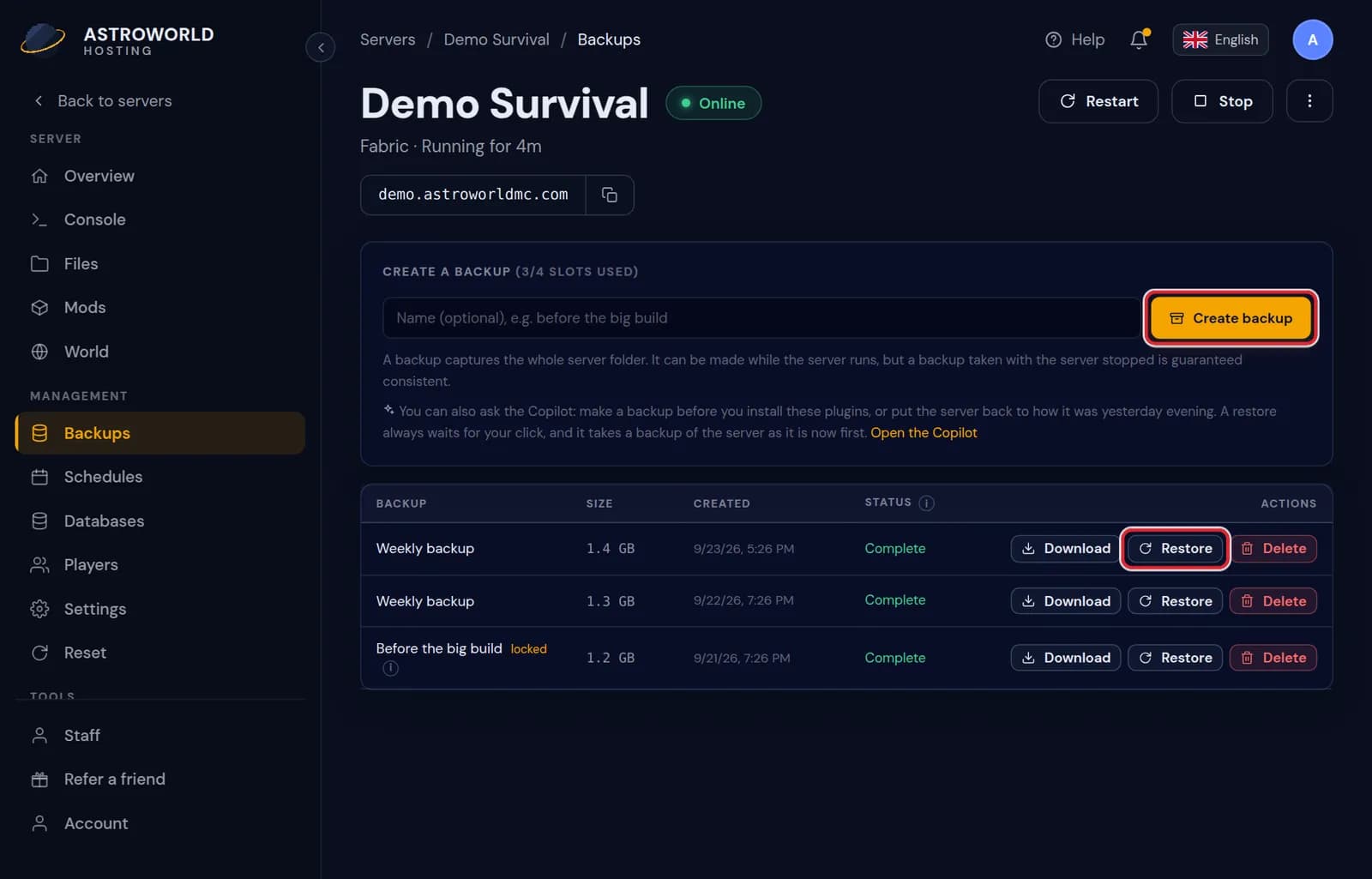
The Backups tab with a list of backups, their size, creation time and the Restore button Press "Restore" next to it and read the warning: everything currently on the server is replaced by this backup.
Confirm with "Restore this backup". When it says "Restore started.", wait until it is finished and start the server again.
Messages you can get while restoring
| What it says | What it means and what to do |
|---|---|
Stop the server before restoring a backup. | A restore replaces every file, which cannot happen while the server runs. Stop it on Overview and press Restore again. |
That backup never finished successfully, so it cannot be restored. | Its status is Failed: nothing usable was written. Pick an older backup marked Complete. |
That backup is back in your slots. | You pressed "Keep it" on a backup in the bin. It is a normal backup again and can be restored. |
Restore started. The server files are replaced; watch the console. | It is running. Large worlds take a few minutes. Start the server once the console shows it is done. |
Not sure which backup is the right one
Make a fresh backup of the current state before you restore. If the backup you picked turns out to be too old, you can go back to how things were a minute ago.
You can also download a backup and look inside it on your own computer first.
The backup you need rolled off
You keep 10 backups. When a new one pushes the oldest out, that one waits another 7 days in the bin at the bottom of the Backups tab. Press "Keep it" to bring it back into your slots, as long as one is free.
Find the moment before it went wrong
The Activity tab shows every start, stop, file change and Copilot action with its time and who did it. Look there for the change that caused the problem, then pick the newest backup made before that time. With a nightly backup that is usually the one from the night before.
What a restore does not touch
The backup holds the server folder: world, plugins, mods, configs and logs. It does not hold your panel settings such as staff, schedules and extra addresses, and it does not touch MySQL databases on the Databases tab. A plugin that keeps its data in a database, such as a logging or economy plugin, keeps today's data after a restore.
Restoring on a plan without backup slots
A few small plans have no backup slots. There is then nothing to restore from the panel, and any world reset cannot be undone. Download the world from the Files tab before risky changes, so you always have a copy of your own.
Questions people also ask
Can I restore only the world and keep my plugins?
The restore button puts back the whole server folder. To take only the world, download the backup, then upload just the world folder on the Files tab with the server stopped.
How often are backups made?
Every night on every plan, and whenever you press "Create backup" yourself. The 10 most recent are kept.
Can I restore a backup onto another server of mine?
Download the backup from the first server, then upload it on the Files tab of the second one with that server stopped. Both servers should run the same type and version.
Does restoring delete the backups I have?
No. The list of backups stays as it was, including the one you restored, so you can go back again if needed.