What you get
The Minecraft server control panel we built ourselves
Most hosts hand you the same open-source panel and call it a feature. We run that panel too, underneath, and its login is still yours. What you actually open is ours: 17 sections in your browser with an AI agent living in them, in 9 languages, and a list of things that are normally a support ticket and here are a button.
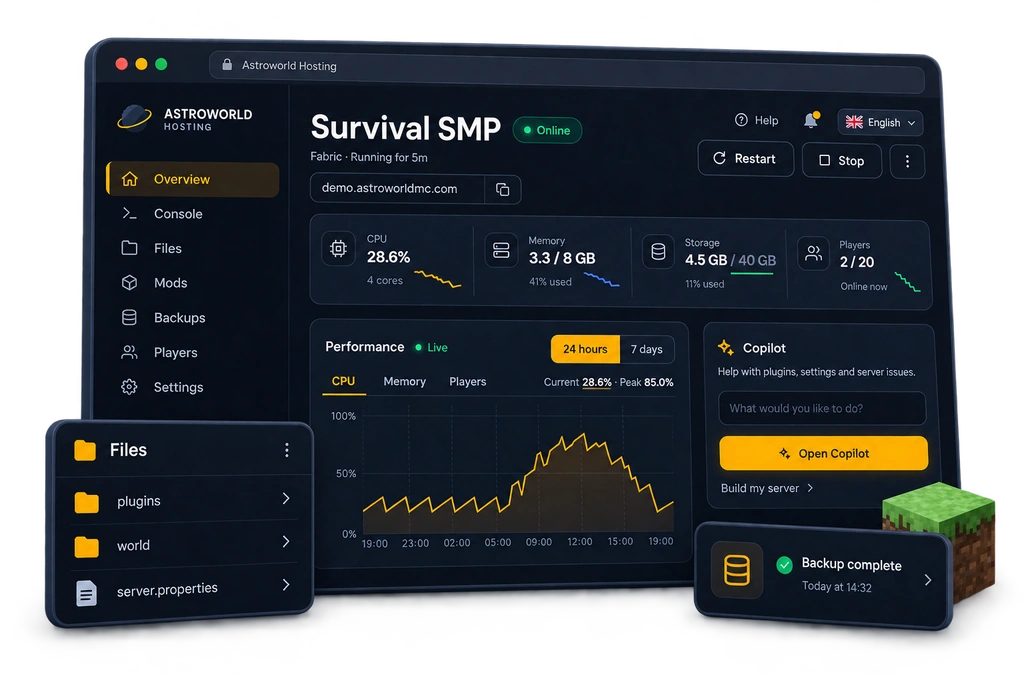
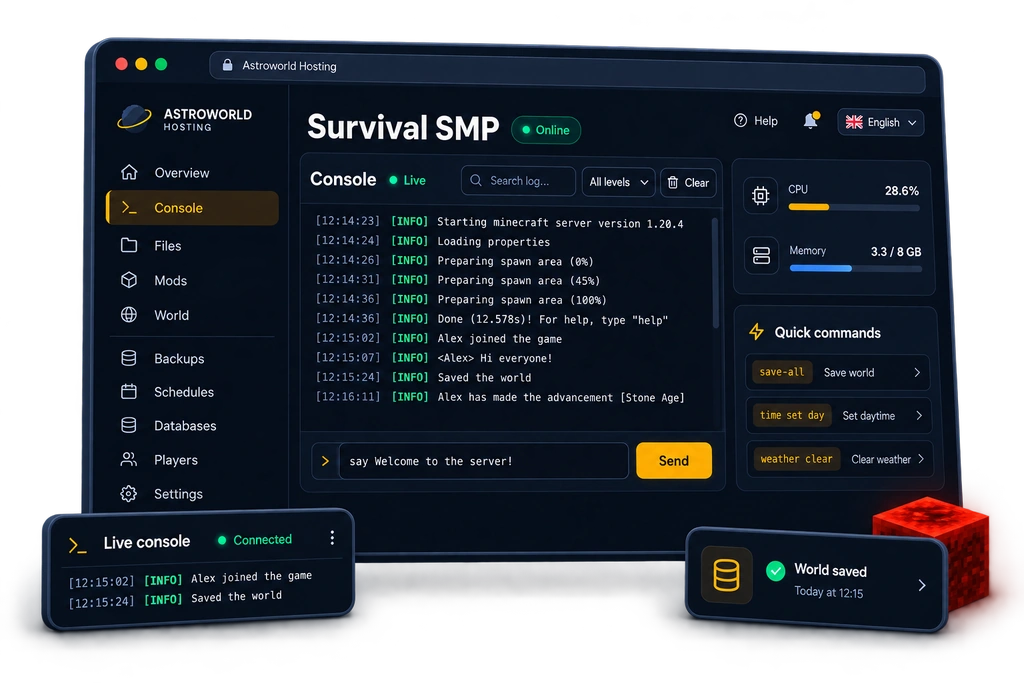
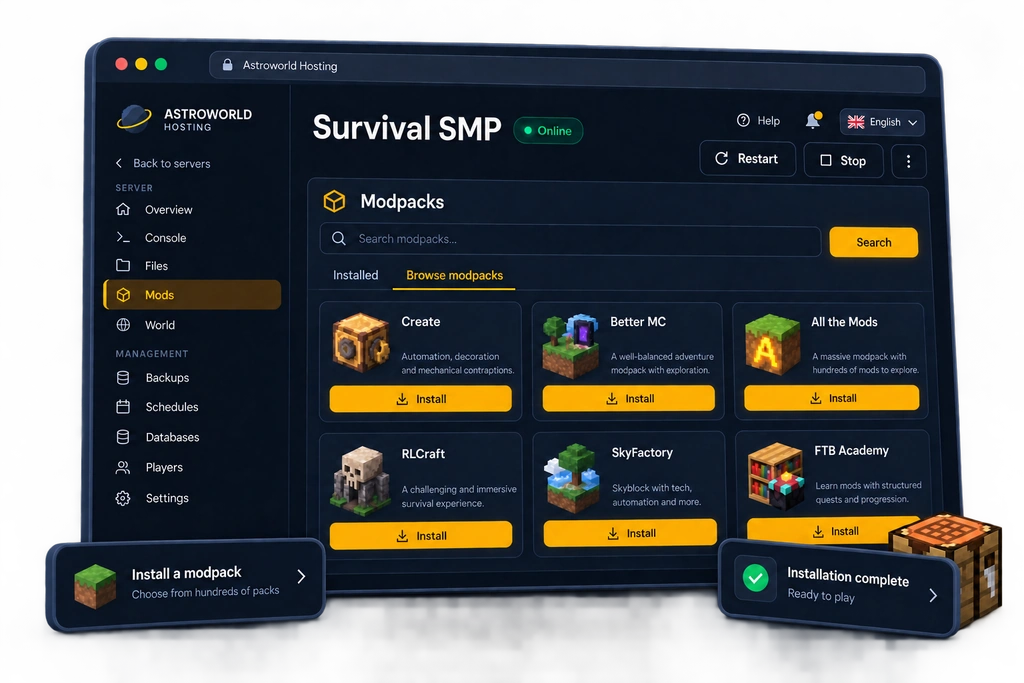
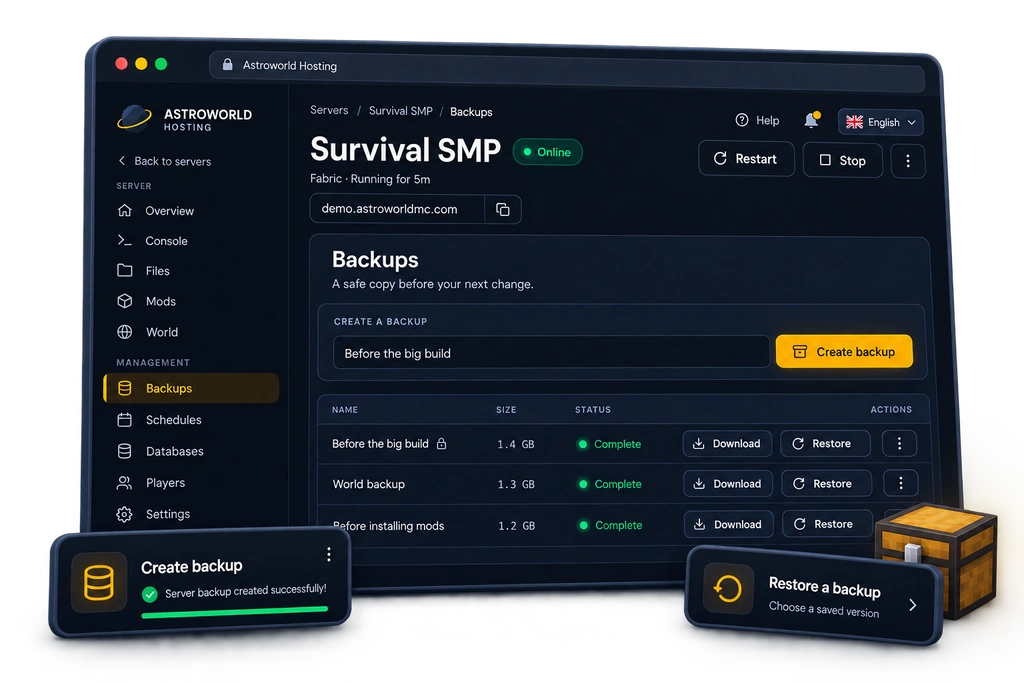
Server overview
17 sections, and no SSH anywhere
The panel is on every plan, from the smallest to the largest, and there is nothing to install. Plugins and Mods are the same slot seen from two sides, so one server shows 16 of these tabs: a Paper server gets Plugins, a Fabric or Forge server gets Mods.
It is our own build from the login page to the console, and there is no second panel next to it that you also have to get through. One address, one password, and everything you do with your server happens there. What else comes with every plan is on the feature list. Nothing here replaces something you had; it is what we put on top.
Every section, and what it is for
| Section | What you do there |
|---|---|
| Overview | Whether the server is up, how much memory and processor it is using right now, how many people are on it, and the play address with a copy button next to it. Graphs over a day and over a week sit under that, so you can see whether last night was normal. |
| Consolelive output with a command line under it | The real console, live, with a command line under it and a filter over it. You can jump back to the latest line after scrolling up, and the panel tells you when the last automatic restart was, so a gap in the output has an explanation instead of a mystery. |
| Filesa real editor in the browser | Every file on the server, with a real editor in the browser and SFTP next to it. Uploads go through us and never expose the machine behind it. A file too large for a browser upload, a world or a big modpack, goes in by pasting a link and letting the machine fetch it itself, which is how you get past the hundred megabyte ceiling a browser upload runs into. |
| Pluginson Paper, Purpur and Spigot | A catalogue of vetted plugins that works out which jar fits your loader and your Minecraft version, downloads it on the server itself and puts it in place. There is no install from a link, on purpose, so nothing can be talked into fetching a random jar. Removing one only ever touches the plugins folder. |
| Modsverified Modrinth server mods | The same thing for Fabric, Forge, NeoForge and Quilt: verified Modrinth server mods, each one checked against its own checksum before it is put in place. A whole modpack goes on in one click, from Modrinth, CurseForge or Feed The Beast. |
| Settings | Your server settings as a screen with explanations instead of a text file, grouped and searchable, with the ones that need a restart marked as such. The Minecraft version is a dropdown here, the server type is a conversion the panel walks through for you, and a server icon, the automatic restart schedule, autosave and a Discord notification you can test on the spot all live on this tab. |
| World | Resetting or clearing a world, in a way that cannot go wrong the way a hand-run reset can: it refuses while the container is running, because a running server writes the world back on shutdown and would quietly undo the reset, and it will not delete a world folder until a backup has actually completed. |
| Backups | One is taken for you every night on every plan. You keep ten, as many as the storage on your plan carries, and the one that rolls off waits another seven days in a bin. You can take one yourself whenever you like, lock one so it never rolls off, restore in one click, and download any of them to your own disk. |
| Schedulesa plain recurrence, we write the cron | Every night at four, every Sunday, every six hours: you pick the recurrence in plain language and we write the cron. A raw cron string is still accepted if you would rather type one. A scheduled backup is one of the things a task can do, and it needs nothing extra. |
| Databaseshands you the credentials | MySQL databases for the plugins that want one, CoreProtect and LuckPerms and their friends, with the credentials in front of you instead of behind a ticket. You can replace the password from the same screen. The host you get is ours and never the address of the machine underneath. |
| Players | Operators, the whitelist and the ban list. While the server runs we send the real console command, because the server holds those lists in memory and a file edit would be overwritten on shutdown. While it is off we edit the files directly and resolve the name to a UUID first, so whitelisting somebody without starting the server works exactly as it should. |
| Activity | One timeline of everything that happened: every start, stop and restart, every file change, every backup, and every change the AI Copilot applied, each with a timestamp and who did it. Anything the Copilot applied can be undone straight from this list, so you never have to find the conversation it happened in. |
| Copilot | An AI agent that works on the server itself rather than telling you what to type. It runs on two models, reads your files, logs and settings, and proposes each change as a card you apply deliberately, with its own undo. It has three modes: ask only, approve each change, or let it work. It also runs a full security check on request, answers six questions and builds a whole server out of the answers, and looks for what is making the server run badly. |
| Experience | What your players say in public chat, sorted for you: lag complaints, grief and theft reports, questions nobody answered, praise, and talk about a dupe or an exploit. It reads the chat that is already in your console log on our own machine, so a whole day of it costs you nothing, and private messages and commands are filtered out on the shape of the log line before anything is read. You switch it on yourself, because it is your players' chat. |
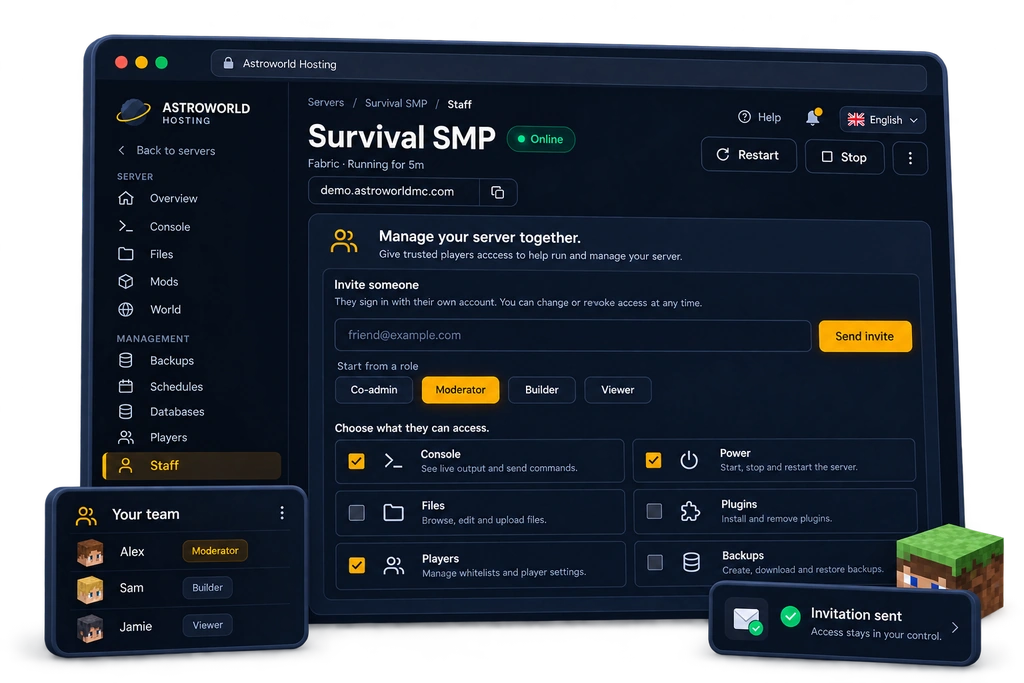
| Staff | Invite people by email and pick per right what they may do, from console access to file deletion. An invitation can go out before that person has an account and links itself to them on their first visit. Only the owner can invite, so nobody can widen their own rights or add an accomplice. |
| Refer | Your referral link, what it has earned and how to have it paid out, in the panel rather than in an email thread. |
| Account | Your display name, your password or your Google sign-in, your subscription and the date of the next payment, and a button through to your invoices and payment methods. Two step verification on your Astroworld account is set in your dashboard and covers everything at once, and the security check tells you if it is still switched off. |
Eight things that are usually a support ticket
This is the part that is hard to see from a feature list. Each of these is a thing people normally open a ticket for, or give up on, and here it is a button that a customer presses.
| What you can do yourself | How it works |
|---|---|
| Switch your server type | Paper to Fabric, Forge to NeoForge, back to vanilla: the panel stops the server, takes a backup, waits until that backup has really finished and only then converts it. A reinstall over a running server leaves you with half a jar, and without a completed backup going back is not a choice but luck, so those four steps are not optional. |
| Change the Minecraft version | A dropdown on the Settings tab, not a ticket and not a jar you go and find yourself. The plugin and mod catalogues follow the version you pick, so what you install afterwards fits what you are running. |
| Pick a second play address yourself | Your free subdomain comes with the plan. On top of that you can choose an extra address yourself, in the panel, without asking us and without touching DNS, because every customer address hangs under one wildcard that already points at our proxy. Your existing address is never changed or taken away: it is in Discords, on server lists and in mail we cannot recall. |
| Undo what the AI did, days later | Every change the Copilot applies is stored with the exact opposite of itself. Undo it from the message it happened in, or from the Activity timeline weeks afterwards, and one button takes back everything a single message changed, in reverse order, because the order matters. |
| Manage players while the server is off | Whitelisting somebody at two in the morning does not need the server up. With it running we send the real console command; with it off we edit the files and look the name up at Mojang for its UUID first, which is what the server itself would have stored. |
| A crash watch you are allowed to switch off | A server that falls over is put back up by us. That is what almost everyone wants and not what everyone wants: while you are working out a modpack, a server that springs back to life fifteen seconds later is an obstacle. So it is a switch in the panel, not a ticket. |
| Reboot your own machine | If you are alone on a box you can restart the box itself from the panel. Guarded twice, by the power right and by the server being flagged as yours alone, so a shared machine can never be rebooted from a customer panel whatever the browser sends. |
| Upload a file bigger than a browser allows | A browser upload runs into a hundred megabyte ceiling on the way in. Paste a link instead and the machine fetches it itself, which is how a world of a gigabyte or a large modpack gets in without anything in the middle. |
How to manage a Minecraft server from the panel
Open the panel, no SSH anywhere
Your server opens in the browser at a panel we built ourselves. There is nothing to install, no key to generate and no command line to learn, and it is translated into nine languages so it is not English or nothing.
Pick the tab you need out of 16
Overview, Console, Files, Plugins, Mods, Settings, World, Backups, Schedules, Databases, Players, Activity, Copilot, Experience, Staff, Refer and Account. Refer is where your referrals sit and what they have earned you, Experience is what your players are saying in chat, and Plugins and Mods are the same slot seen from two sides. The order in the bar is the order in this list, so what you read here is what you see there.
Or ask the Copilot to do it
The same panel has an AI agent in it that reads your files, logs and settings and works on the server itself. It proposes each change as a card you apply on purpose, and every applied change keeps its own undo.
See afterwards what happened
The Activity tab merges what the server did with what the Copilot applied into one timeline, with a timestamp and a name on every line, and an undo button next to anything the AI changed.
What the panel will not let you do
A panel that lets you do everything instantly is a panel that lets you lose everything instantly. Four things are deliberately harder here than they could be, and all four are the same lesson learned the expensive way.
- Your existing play address
- Your world, without a completed backup
- A world reset while the server runs
- Anything that decides who gets in, by the AI
A world reset refuses while the container runs, because a running server holds the world in memory and writes it back on shutdown, so the reset would quietly undo itself. Nothing deletes a world folder until a backup has actually completed. Your existing play address is never changed or removed, only added to. And of the 63 server settings, the 20 that decide who gets into your server are read only to the AI, in every mode, for good.
It also talks to your Discord
Two of the tabs above reach outside the panel. Settings holds a notifications card where one webhook sends crashes, recoveries, finished backups and words you pick out of your own console into a channel you choose. Next to it is a Discord bot that goes the other way: your members type a command and get the status, the player list or the play address, and whoever you trust can restart the server without ever opening this panel.
Both are on every plan, both are switched on separately, and neither needs the other. Together they are the part of the panel that works while nobody has the panel open.
The AI part, in one paragraph
The Copilot is a tab like any other, included on every plan. It reads your files, your logs and your settings, and it works on the server rather than telling you what to type. Every change arrives as a card you apply on purpose and every applied change keeps its own undo, findable later from the Activity timeline. It also runs a 31 point security check on your own server, and an AI performance optimizer for when the server is running badly instead of unsafely.
What it may do is yours to decide: ask only, approve each change, or let it work. The full explanation is on the AI Copilot page.
Questions about the Minecraft server panel
What control panel do Astroworld Minecraft servers use?
Our own. It is a panel we built and run ourselves, 17 sections in your browser of which 16 apply to any one server, with an AI Copilot in it and translated into 9 languages. Everything you need sits in that one panel, from the live console to the backups, so there is nothing else to log into and nothing to install before you start.
Can I change my Minecraft version myself?
Yes, from the Settings tab. Pick the version you want and the panel does the rest, and the plugin and mod catalogues follow that version so what you install afterwards fits it. You do not open a ticket for this and you do not go and find a jar.
Can I switch from Paper to Fabric without losing my world?
Yes. The panel stops the server, takes a backup, waits until that backup has actually completed and only then converts the server type. Your world folder is not touched by the conversion, and if you do want to go back the backup from a minute earlier is sitting there.
How many backups do I get, and do they cost extra?
10 on every plan, at no charge. One is taken for you every night and you can take more yourself whenever you like. When a new one needs room the oldest moves to a bin that holds it for another 7 days, you can lock one so it never rolls off at all, and you can download any of them to your own disk.
Can I give someone access without giving them everything?
Yes, 15 rights, handed out one by one. Console but not files, backups but not billing, whatever fits that person. You invite by email, and the invitation works even if they do not have an account yet. Only the owner can invite or change rights, so nobody can widen their own.
Can I undo something the AI Copilot changed?
Yes, and not only in the moment. Every applied change is stored together with the exact opposite of itself, so you can undo it from the conversation or from the Activity timeline days later. One button takes back everything a single message changed, in reverse order.
Do I get SFTP and a real file editor?
Both. Files opens a real editor in the browser, and SFTP is there for the times you would rather work from your own machine. Uploads and downloads go through our own domain, so the machine your server runs on never has to be exposed to your browser. A file too big for a browser has its own way in: paste a link and the machine fetches it itself, which is how a world of more than a gigabyte gets here without a support ticket.
How do I change server.properties without breaking anything?
The Settings tab shows all 63 settings in 6 groups with an explanation next to each one, marks the ones that only take effect after a restart, and warns on the ones that change the game for everybody. You can still edit the file by hand in the Files tab if you prefer.
Is the panel available in my language?
It is in 9: English, Dutch, German, French, Spanish, Portuguese, Italian, Polish, Russian and Turkish. That is the whole panel and not just the menu, error messages included.
Can I try the panel before I buy anything?
Not as a live sandbox you can open from here, and it is fairer to say that than to promise one. What you get instead is this page: every section of the panel described from the customer's side, with the numbers it really enforces and the limits it really refuses, so you can read exactly what you would be working in before you spend anything. If what you are weighing up is which plan to take rather than what the panel does, six questions put one plan in front of you instead of a price list, and the panel is the same on every one of them.
Restarting the machine itself, not just the server
There is a difference between the server process and the box it runs on, and it only matters on the day something goes wrong in the second one. Restarting the server is a button everybody has. Restarting the machine underneath it is the thing you normally have to open a ticket for and then wait, at the exact moment waiting is the expensive part.
If you are the only customer on your machine, that button is yours. Two locks sit in front of it and both have to agree: the person pressing it needs the power right, and the server has to be flagged as one with nobody else on the box. A machine with other customers on it can therefore never be restarted from a customer panel, whatever gets sent at it, and on those plans the button is not shown at all rather than shown and refused. It is meant as a recovery tool for the rare morning when the box itself is wedged, not as a second restart button, and it reads that way in the panel.
Where to find it
The panel is included on every plan and there is nothing to order for it. Every section above is described from the customer's side with the numbers the panel really enforces, so you can find your way around it and know what you would be working in before you pay for anything. What you are buying is the same panel on every plan, and if the open question is which plan rather than what the panel does, six questions will put one in front of you rather than a price list to work through on your own.
Answer six questions and get one plan Uploading your own world What is included with every plan Everything the AI Copilot can do Every server.properties setting explained Changing your version or server type Your play address, and adding more Staff permissions, right by right How the nightly backups work How to restore one of them The Discord bot and its commands Discord notifications from your server The AI security check on your server View plans and prices Ask us a question first
The 17 sections, the 510 plugins in the catalogue, the 63 server settings and the 15 staff rights are read from the panel's own code when this page is built, so they change with the product. Written 30 August 2026.
Written and checked by the Astroworld Hosting team. Last reviewed on 6 September 2026.
Delivery: most servers are handed over instantly and run within seconds of payment, the rest follow within 60 minutes during the day and within 12 hours at night.