AI in the panel
Minecraft Server AI Copilot
An AI agent lives in the panel next to your Minecraft server, and it does the work rather than telling you how. Ask Quasar for a complete setup and it takes a backup, installs and configures the plugins, writes the config files, creates the worlds and checks the console after every step, up to 30 steps in one message. It can install 510 plugins, edit 63 settings and send 45 console commands, and every change it makes undoes in one click.
Watch Pulsar and Quasar work on a Minecraft server
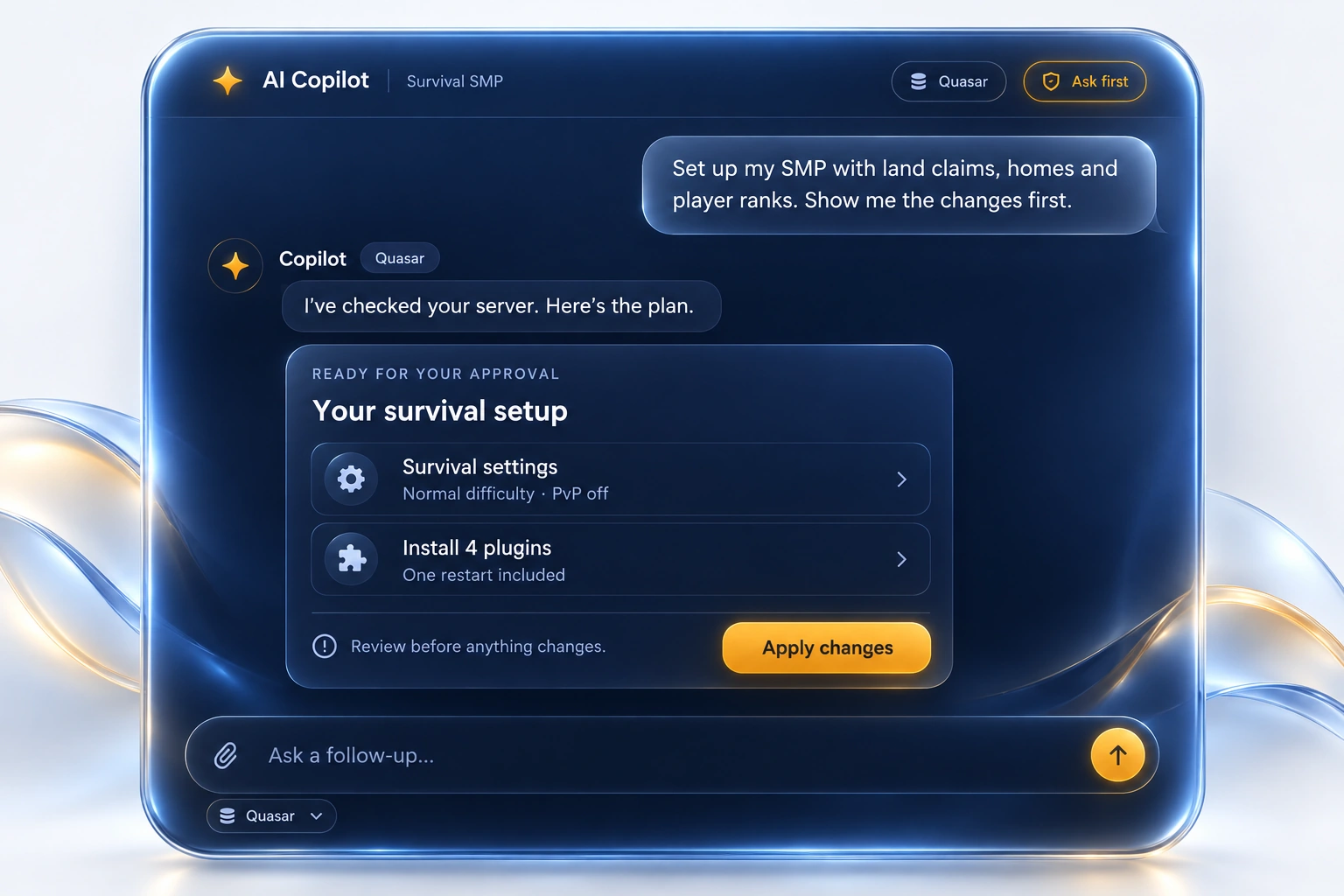
Two models, one chat box
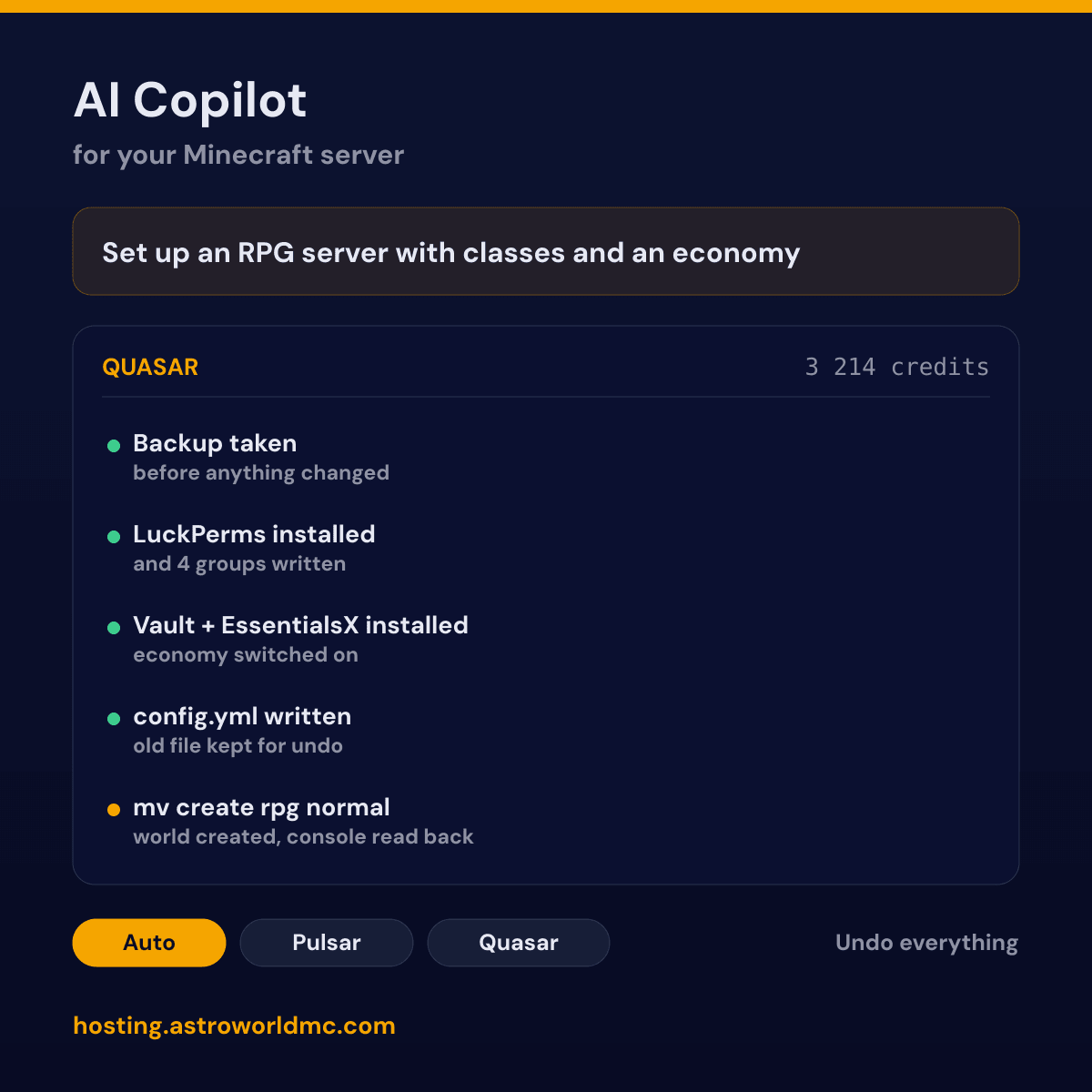
There are two engines behind the same chat box. Pulsar answers in seconds and takes up to 8 steps, which covers a question, a crash to read out or a single plugin to put in. Quasar takes up to 30 steps in one message and keeps going until the job is finished, checking the result of every step before it starts the next one. There is a third setting called Auto, and it is the one most people leave on: the panel reads your message and picks the engine that fits, so a one line question never costs you a large job and a large job never gets a one line answer.
| Engine | How far it goes | What it is for |
|---|---|---|
| PulsarThe fast one, on by default for short questions | up to 8 steps in one message | Why is my server offline, what does this crash mean, install one plugin, change one setting, read the last lines of the console. |
| QuasarThe one that keeps working until the job is done | up to 30 steps in one message | Build a whole setup: back up first, install and configure several plugins together, write full config files, check the console after each step and fix what broke. |
What Quasar can build on its own
Quasar is the part that makes this more than a help desk in a chat box. It is an agent: it decides which of its 20 tools to use, it uses them on your live server, it reads what actually came back, and it decides the next step from that. Up to 30 of those steps fit in one message, which is why a request that would be an afternoon of clicking through a panel is one sentence to Quasar. You do not get a numbered list telling you what to do. The work is done when it answers.
These are the kinds of request it takes in a single message, not a menu of buttons but the actual sentences people send it:
- Set up an RPG server: classes, quests, an economy, a shop and the permissions to match
- My server lags every evening around eight, find out why and fix what you can
- Move my survival world to a new world manager and keep the spawn and the game rules
- Install a web map, put it on the right port and make it match my world border
- Go through my plugin configs and tell me which settings are fighting each other
- Set up a staff hierarchy with four ranks, prefixes and the permissions each rank needs
- Read the crash from last night and stop it from happening again
- Get this modpack server ready for twenty players instead of five
What happens after you press send is always the same shape, and it is the part that separates an agent from a chatbot that writes confident instructions:
It takes a backup first
Before it touches anything on a job of this size it makes a full backup, without being asked. If the rest goes wrong you are one restore away from where you started, on top of the undo that every single change keeps.
It looks at what you already have
Which server software and Minecraft version you run, which plugins are already installed and in which versions, what the console said in the last minutes, what your current settings are. It works on your server as it is, not on a clean example server.
It splits the job into pieces and starts
A request like an RPG server is not one action but a dozen: a permissions plugin, an economy plugin, a world manager, a config file for each, an extra world, groups and their permissions. It does them one at a time instead of dumping a plan on you.
It reads the real result of every step
After a command it waits for the console and reads back what the server actually answered. After a file it reads the file. A tool result is the truth and its own expectation is not, so a plugin that failed to load is caught in the next step rather than at the end.
It fixes what broke, or it stops and says so
A missing dependency, a config key that moved between versions, a plugin that needs another one first: it deals with those as they come up. What it cannot fix it says out loud, at the point where it happened, instead of carrying on as if the step worked.
It tells you where it got to
At the end you get a list of what changed and what is still open, every item with its own undo, and one button that takes the whole message back. If it runs out of steps or credits halfway it says exactly where it stopped so you can tell it to carry on.
It thinks harder than the fast engine before it acts, it writes longer answers when the job needs them, and it is allowed to keep going for as long as the work takes instead of stopping at a tidy paragraph. That costs more credits per message than a quick question, and it is the reason there are two engines rather than one: a question about your MOTD does not need thirty steps, and a whole server build does not fit in eight.
The safety rails do not loosen for it. Quasar installs from the same 510 vetted plugins, edits the same files, may send the same 45 console commands, and still cannot stop or restart your server without a person clicking. Everything it does keeps its undo, and one button takes back a whole message even when that message changed twenty things.
What it can do on your server
This is the whole list. 10 of these 20 tools only read, 7 change something and keep an undo, and 3 never run without your click: a restart, because it drops everyone who is online, and a restore, because it replaces every file on the server. It is the same list the agent itself is handed, so what is not here it cannot do.
| Tool | Reads or changes | What it does |
|---|---|---|
| Live status | reads | Power state, CPU, memory and disk of your container at this moment. |
| Console log | reads | The tail of the running log, which is where a crash and a broken plugin actually say what happened. |
| File list | reads | What is in a folder on your server, so it can find the config it needs instead of guessing. |
| File contents | reads | One settings file at a time. Keys, passwords and player lists are refused, see the safety section. |
| Installed plugins | reads | The jars that are actually in your plugins folder, with their versions. |
| Plugin catalogue | reads | The 510 plugins it is allowed to install, in 15 categories. |
| Current settings | reads | The 63 server.properties settings it knows, with what each one currently is. |
| Install a plugin | changes | Downloads the right build for your loader and Minecraft version, from the catalogue only. |
| Turn a plugin off | asks first | Renames the jar so the server stops loading it. The file and its settings stay, so one click puts it back. |
| Turn a plugin back on | changes | Puts a plugin that was turned off back into service, under the name it already had. |
| Change settings | changes | Difficulty, view distance, the MOTD, the player limit and the rest, one or several at a time. |
| Write a config file | changes | A whole file at once, for the 9 known server configs and anything in the plugin config folders. |
| Startup variable | changes | The values your container starts with, such as the Minecraft version or the memory flag. |
| Take a backup | changes | A full backup before it starts on anything large, on its own initiative. |
| Console command | changes | Sends a command to the running server and reads the answer back out of the console. 45 commands are allowed and nothing else. |
| Restart | asks first | Never happens on its own in any mode, because a restart drops the players who are online. |
| Performance check | reads | Tick time, tick rate, memory, entities per type, chunks and garbage collection in one pass of about seven seconds. |
| Security check | reads | 31 checks on who can join, who can run commands, open ports, your plugins and the recent console log. |
| Backup list | reads | Every backup with the exact moment it was taken, its size and whether it finished. This is what makes an honest answer about going back possible. |
| Restore a backup | asks first | Puts the whole server back to one of its backups. Never applied in any mode, and it takes a backup of the current state before it starts. |
The catalogue it installs from holds 510 plugins across 15 categories, and it resolves the build for your exact loader and Minecraft version at the moment it installs, so you do not end up with a jar for the wrong version. The names you would expect are in it:
- EssentialsX
- LuckPerms
- WorldEdit
- WorldGuard
- Vault
- CoreProtect
- Multiverse-Core
- PlaceholderAPI
- Dynmap
- ViaVersion
- Spark
- Chunky
Three modes, the way a code editor does it
How much the Copilot may do without asking is your choice, and you set it under the message box per message. The three modes are borrowed from the coding tools that got this right: you start by approving everything, and you loosen it once you trust what it does.
| Mode | Goes through without asking | What that means |
|---|---|---|
| Ask | nothing at all | It reads everything it needs and then puts a card on the screen for each change. Nothing happens until you press Apply. |
| Accept edits | settings, config files, plugins, backups | The everyday work goes through on its own. A restart and anything that touches the players online still stops and asks. A plugin you install or switch back on is different: that card restarts the server once by itself, so the plugin loads. |
| Auto | everything on the allow list | For a long job you do not want to sit and click through. The allow list does not get bigger in this mode, so the same things stay refused. |
A restart is in none of the three. It drops everyone who is online, so it always waits for a person, even on Auto, even halfway through a job it started itself.
Backups it takes itself, and the one it will not press for you
Every server here gets a backup every night, ten slots, and an eleventh place that keeps the one that rolled out of the list for seven more days. That part runs whether you ask for it or not. What is new is that the Copilot can work with them: it sees the list with the exact moment each one was taken, it takes one on your word, and it can put the server back to one of them.
"Make a backup before I install these plugins" is the easy half. It takes one, then checks that it actually finished before it touches anything, because a backup that is still running is not a backup yet. On a job of any size it does this without being asked.
"Put the server back to how it was yesterday evening" is the half that needed rules. Three of them. First, there is no restore to a point in time: there are snapshots, so it tells you which one is nearest to the moment you named, at what time it was taken, and what falls in the gap. Second, it never presses the button. Not on Ask, not on Accept edits, not on Auto: a restore replaces every file on the server, so it waits for you. Third, and this is the one that makes the rest safe, it takes a backup of the server as it is at that moment before it restores anything. That backup is the way back, so a restore you regret is one click from undone, exactly like every other change it makes.
The server is stopped for the restore and started again by you, which is not us being careful for the sake of it: a server that is running holds the world in memory and writes it back when it shuts down, so a restore with the server up would quietly undo itself. And deleting a backup is not on its list at all. It can push the oldest one into that seven day trash to make room, the same way the nightly round does, and that is as close as it gets.
Restoring a backup, step by step walks through both routes side by side, and the backups themselves are on their own page.
One click takes it all back
Every change the Copilot makes is written down with the way back next to it. A changed setting keeps the old value, a written config file keeps the file as it was, an installed plugin can be uninstalled, and a console command stores the command that reverses it if an exact opposite exists, as with the whitelist, op and ban. A command that has none, like a LuckPerms group or a game rule, shows no Undo button, and you go back with a new command or with a backup. That is per change, and you see them listed under the message that made them.
Under every message there is also a single button that takes back everything from that message that has a way back, and it tells you how many it could not undo. It walks the changes in reverse order, so a config file written after a plugin was installed goes back before the plugin does, and you end up where you started rather than halfway. Before a large job the Copilot takes a full backup on its own as well, which is the layer under the undo.
It remembers your server, so you stop repeating yourself
The Copilot keeps a memory per server, and it has two halves that are deliberately kept apart. The first half we measure ourselves: your server type and version, how many plugins are installed and which ones, how much memory and CPU your plan gives you, and the settings people actually care about such as difficulty, whitelist, PvP and view distance. Nobody types that half in. It refreshes itself every day, and the Copilot is told plainly that if a tool says something different, the tool is right and the memory is stale.
The second half you write: up to 2,000 characters of house rules, one per line. Keep the economy plugin enabled. Never remove the permissions plugin. Do not reset the world. Take a backup before anything big. The Copilot reads those before every single message, so you never have to say them twice, and it quotes the rule back at you when it follows one.
Two things about house rules that matter more than they sound. They can only make it more careful: a rule can never hand the Copilot a permission it does not have, and if a rule seems to allow something the safety checks refuse, the checks win and it says so. And the memory sits in the cached part of the conversation, so it is paid for roughly once every five minutes instead of on every step, while it removes the looking-around the Copilot would otherwise do at the start of every chat. Remembering your server makes it cheaper, not dearer.
It reads your public chat, on our machines, for nothing
Your players tell you what is wrong with your server every day, in chat, and nobody has time to read all of it. So we do. The Player experience tab sorts your public chat into lag complaints, grief and theft reports, questions nobody answered, moderation complaints, praise, players talking about leaving, and the one that matters most: somebody in chat casually mentioning a dupe, a glitch or an exploit. That last one usually shows up in chat hours before it shows up in your economy.
This runs on a language model on our own machines, not on a paid one, which is why a whole day of chat costs you nothing at all. Measured on our hardware it sorts 200 messages a second, so a busy day of ten thousand chat lines takes under a minute of a machine nobody is otherwise using. Only if it finds something serious, and only if you switch that on separately, does one short summary go to the Copilot and cost credits. Find nothing, pay nothing.
Private messages are never read. Not filtered out afterwards, never read: whispers, direct messages and every command a player types are recognised by the shape of the log line and skipped before anything looks at them, and we show you how many were skipped so you can see the filter working. It is off until you turn it on yourself, because it is your players' chat and not ours, and when a round finds something serious it can post it straight into your Discord.
What it is not allowed to do, and why that is in the code
An AI that can change a live server needs walls that a sentence cannot move. These limits are not written in the instructions we give the model, they are checks in our own code that run on every action, so a message that talks the model into trying something still hits the wall.
- Console commands go through three locks: the shape (one line, no chaining, no links), a deny list, and an allow list of 45 first words. Stopping the server, opping everyone, turning off the whitelist, banning an IP and clearing an area are all refused, in every mode.
- Plugins come from our catalogue of 510 vetted projects and from nowhere else. There is no install from a link anywhere in the product, so there is no prompt that produces one.
- Files stay inside the settings folders. Keys, certificates, environment files, your ops list, your whitelist, your ban lists and anything holding a password are refused by name, wherever they sit.
- Your server is never stopped or restarted without a person clicking, and nothing outside your own container is reachable at all.
- Every action is logged with who asked for it, what changed and how to undo it, so the history of a server is a list you can read back rather than something you have to trust.
The settings it does know are the 63 in server.properties plus 9 known configuration files for Paper, Purpur, Spigot, Pufferfish and Fabric, and the config folders of the plugins you have installed.
What it costs, in credits
The Copilot is included with every plan and there is nothing to order. Each server starts with 2,500 credits, and what a message costs depends on how much work it was: a short question to Pulsar is around 200 credits, a large job for Quasar runs into a few thousand. You watch the number move while it works, so there is no bill at the end that surprises you.
| Pack | Price | What that buys |
|---|---|---|
| 25,000 credits | €5.00 | 5.00 euro, so 125 short questions or 8 large jobs. |
| 75,000 credits | €15.00 | 15.00 euro, so 375 short questions or 25 large jobs. |
| 200,000 credits | €36.00, 10% off €40.00 | 36.00 euro, so 1,000 short questions or 67 large jobs. |
| 500,000 credits | €85.00, 15% off €100.00 | 85.00 euro, so 2,500 short questions or 167 large jobs. |
| 1,000,000 credits | €170.00, 15% off €200.00 | 170.00 euro, so 5,000 short questions or 333 large jobs. |
Buying more at once costs less per credit: 10% off from 200,000 credits, and 15% off from 500,000 credits. That discount is not a code you have to find and it is not a first order only deal, it is simply the price of that amount. You do not have to take one of the packs either: in the panel you can type your own number, anything from 10,000 to 2,000,000 credits, and the same discount applies to it. A server that runs one large Quasar job a day gets through roughly 90,000 credits in a month, so most owners buy once and forget about it for a while.
Credits do not expire and there is no monthly fee for the Copilot. If you would rather not think about it, you can switch on automatic top up: pick the level it may drop to and the pack it should buy, and it tops up from your saved card. That switch is the server owner's, not a staff member's.
Questions about the AI Copilot
Can the Copilot put my server back to how it was yesterday?
It can restore any backup this server has, and it will tell you honestly which one is nearest to the moment you name, because backups are snapshots and not a point in time. It never does it on its own: a restore replaces every file on the server, so the card waits for you to press Restore, in every mode. Before it restores, it takes a backup of the server as it is at that moment, so the restore itself can be undone with one click. The server is stopped for it, which disconnects whoever is online, and it starts again when you start it.
Does it make a backup before it changes things?
Yes, and you can also just ask for one: "make a backup before you install these plugins" is a normal sentence to it. On a large job it takes one on its own initiative, and it checks that the backup actually finished before it starts changing anything, because a backup that is still running is not a backup yet. Every server has a backup every night as well, with ten slots and a trash that keeps the one that rolled out for another seven days.
What is the AI Copilot?
An AI agent that sits in the panel next to your Minecraft server and can work on that server itself. It reads your live status, your console log, your configuration files and your installed plugins, and it can install a plugin, change a setting, write a config file, take a backup and send a console command. It has 20 tools in total, and every one of them works on your own server, not on a copy.
What is the difference between Pulsar and Quasar?
Pulsar is the fast one and takes up to 8 steps in a message, which is enough for a question, a crash to explain or one plugin to install. Quasar takes up to 30 steps and keeps working through a job: back up, install, configure, check the console, fix what broke, then the next piece. On Auto you do not pick at all, the panel reads your message and sends it to the one that fits.
How large a job can it actually do?
A complete server setup in one message. Ask for an RPG server and Quasar takes a backup, installs the permissions plugin, the economy plugin and the world manager, writes the config files for each of them, creates the extra world, sets the groups and their permissions, and tells you at the end what it did and what it could not do. You watch every step appear while it works.
Is Quasar an AI agent or a chatbot?
An agent. A chatbot answers with instructions and leaves the work to you. Quasar picks a tool, uses it on your live server, reads what actually came back and decides the next step from that result, and it repeats that up to 30 times in a single message. That loop is the difference: it is working on your server while you read along, and what it reports at the end is what happened, not what it expects would happen.
How is this different from asking a general AI chatbot about my server?
A general assistant does not know which Minecraft version you run, which plugins you have, what your config files say or what your console printed two minutes ago, so it gives you a good general answer that may not fit your server. Quasar reads all of that first, from your actual container, and then changes it for you. It also cannot make things up about your setup: everything it tells you comes back from a tool that looked.
How long can Quasar keep working on one request?
Up to 30 steps in one message, and a step can be installing a plugin, writing a whole config file, running a console command and reading the answer, or taking a backup. If the job needs more than that it stops and tells you exactly where it got to and what is left, so you can send it on with one sentence. It also stops if your credits run out, in the same honest way, rather than half finishing something without saying so.
Can I undo what it changed?
Yes, and that is the point of the whole design. Every single change keeps its own undo: a setting remembers the old value, a config file keeps the old file, an installed plugin can be removed again, a console command keeps the command that reverses it whenever an exact opposite exists, as it does for the whitelist, op and ban. A console command without one, such as a LuckPerms group or a game rule, gets no Undo button, and its way back is a new command or a backup. Under every message there is also one button that takes back everything from that message, in reverse order, and tells you how many changes, if any, it could not take back.
What is it not allowed to do?
It cannot stop your server, restart it without asking, op a player, turn off the whitelist, ban an IP or clear a world. A restart follows the mode you pick. In Ask and Accept edits a restart card waits for your click; in Auto, where you let it do everything it is allowed to on its own, it goes through without one. Installing a plugin or switching one back on restarts the server once on that same card, so in Accept edits and Auto that restart needs no click either, because a plugin only loads when the server starts. It cannot install a plugin from a link, only from our catalogue of 510 vetted ones. It cannot open your keys, your player lists, your ops file or anything that holds a password, and it cannot leave the settings folders. Those limits are in the code, not in the prompt, so no clever message gets around them.
What does it cost?
Nothing extra on top of your plan to start: every server gets 2,500 credits, which is worth €0.50, and a short question is around 200 credits. After that you buy credits in the panel, from €5.00 for 25,000. There is no subscription for it and credits do not expire.
Is there a discount on bigger credit packs?
Yes, and it is on the price itself, not a code: 10% off from 200,000 credits, and 15% off from 500,000 credits. The largest pack is 1,000,000 credits for €170.00 instead of €200.00. You can also type your own number in the panel, from 10,000 to 2,000,000 credits, and the same discount applies to that amount.
Does it remember my server between chats?
Yes. Every server has a memory with two halves. We measure one half ourselves, so it always knows your server type and version, which plugins are installed, what your plan gives you and how your main settings stand, and it refreshes daily. The other half is up to 2,000 characters of house rules you write, one per line, which it reads before every message. House rules can only make it more careful: they can never grant it a permission, and the safety checks always win. It also makes the Copilot cheaper, because it no longer has to go and look up what is installed before it can answer.
Can it tell me what my players are complaining about?
Yes, and reading a whole day of chat costs you nothing, because that part runs on a language model on our own machines rather than a paid one. It sorts your public chat into lag complaints, grief and theft reports, unanswered questions, moderation complaints, praise, players talking about quitting, and talk about a dupe or exploit, and it can post the serious ones straight into your Discord. Private messages and commands are never read: they are recognised by the shape of the log line and skipped before anything looks at them. It is off until you switch it on, because it is your players' chat.
Does it work on its own without me watching?
Only as far as you let it. In Ask mode it prepares every change and waits for your click. In Accept edits the everyday changes go through and the risky ones still ask. In Auto it works through the whole job by itself. You switch modes under the message box, per message, and the undo works the same in all three.
Who can use it, and can my staff use it too?
It is on for every server on our panel and it is included, there is nothing to order. Anyone you gave the Copilot right can talk to it, so a moderator can ask why the server lagged last night without getting the keys to your billing. Buying credits stays with the server owner alone.
Where to find it
The Copilot is in the panel of every Astroworld server, under the Copilot tab, and it is on from the first minute your server exists. You do not install anything and you do not order anything.
One thing it does deserves its own page, because it answers a question people ask before they ask about an assistant at all: the AI performance optimizer measures your live server in one pass, from tick time and tick rate to loaded entities per type, ticking chunks, memory and your plugins, and tells you in one sentence what is slowing it down. The thresholds it judges against are published there in full.
The AI security check, and what it looks at The panel the Copilot lives in Everything else that is included Installing plugins by hand Setting up crossplay by hand Reducing lag by hand Setting up permissions by hand View plans and prices Ask us a question first
The plugin count, the settings count, the command count, the step limits and the credit prices on this page are read from our own Copilot configuration when this page is built, so they change with the product. Written 30 August 2026.
Written and checked by the Astroworld Hosting team. Last reviewed on 6 September 2026.
Delivery: most servers are handed over instantly and run within seconds of payment, the rest follow within 60 minutes during the day and within 12 hours at night.