Minecraft hosting guide
server.properties, every setting explained
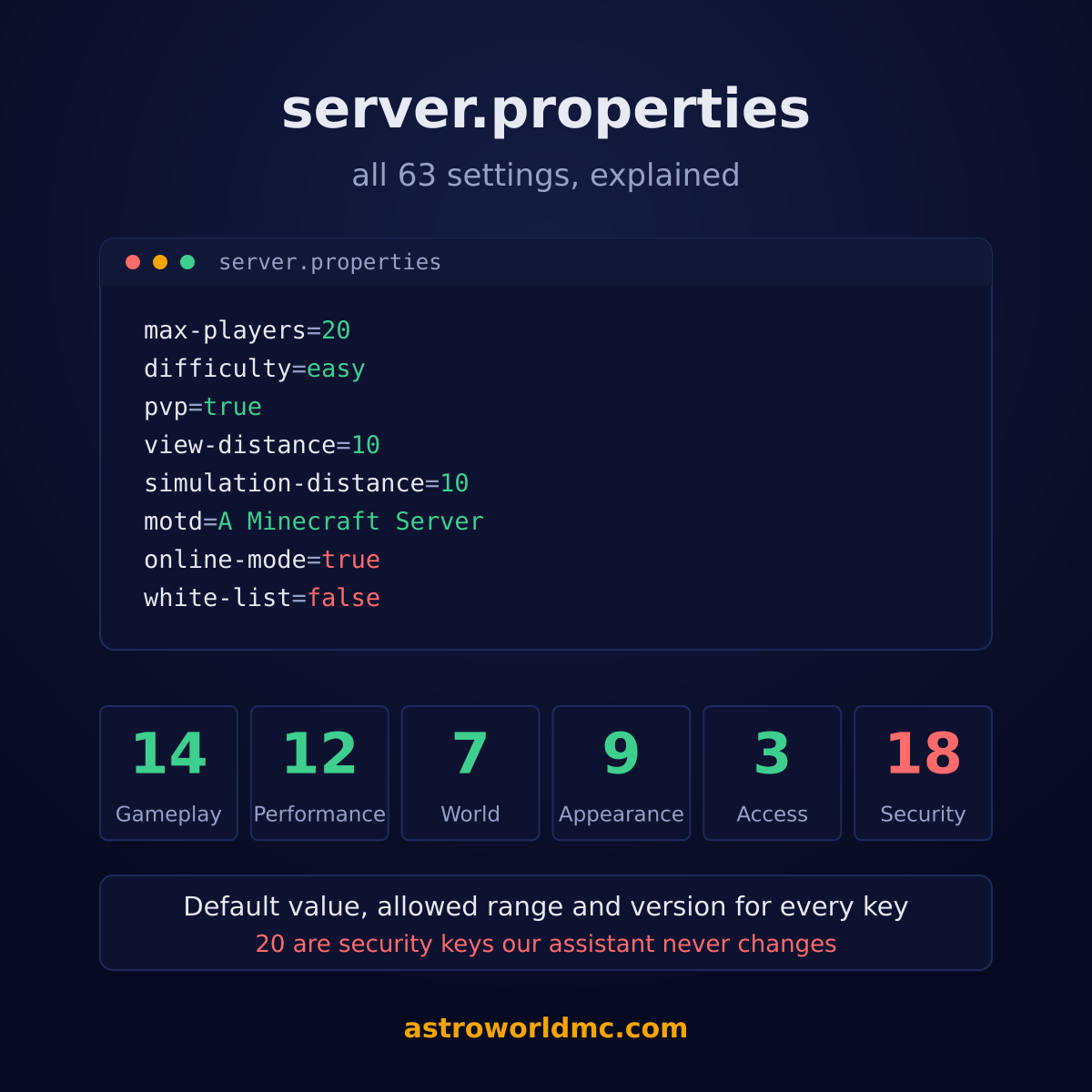
All 63 keys a Minecraft server reads out of this file, with what each one does, the value it starts on, and what you are allowed to put in it. Grouped by what they change rather than alphabetically, because nobody has ever looked one up alphabetically.
The short answer
Read once, at start
Every one of the 63 keys takes effect on the next boot. An edit that does nothing has not been restarted.
Two keys cost more than the rest together
view-distance and simulation-distance. Look there first when the server feels slow.
Some keys open the server
online-mode, the ports, the whitelist. Change them deliberately; a wrong value here does not make the game worse, it makes the server open.
All 63 keys below, grouped by what they change, with defaults and allowed values.
Three things worth knowing before you scroll
The file is read once, when the server starts. Every one of these 63 takes effect on the next boot and not a moment earlier, so an edit that seems to do nothing has almost always just not been restarted.
A key the server does not recognise is ignored rather than rejected. 11 of these arrived with a specific release, which is why a 1.16.5 server knows 52 of them and a 1.21.4 server knows 63. Nothing goes wrong if you leave a newer line in an older file.
The last column says who may change it. 39 are free to change, 4 decide which world loads, and 20 decide who reaches your server at all. That grouping is not advice, it is the same rule our panel and our AI assistant run on. The seed is the one that surprises people most, and the guide to changing the seed explains why editing it alone never changes a world that already exists.
How the game plays
The settings people come looking for first. Every one of them changes what a player notices the next time they log in.
| Setting | Default | Values | Who may change it |
|---|---|---|---|
difficultyHow hard the game is. On peaceful, hostile mobs do not spawn at all and hunger does not drain. | easy | peaceful, easy, normal, hard | Free to change |
gamemodeThe mode a player starts in the first time they join. | survival | survival, creative, adventure, spectator | Free to change |
force-gamemodePut every player back in the default gamemode each time they join, instead of remembering what they were in. | false | true or false | Free to change |
hardcoreDeath is permanent: a player who dies is put in spectator and cannot respawn. Turning this on affects everyone. | false | true or false | Free to change |
pvpWhether players can damage each other. | true | true or false | Free to change |
max-playersHow many people can be online at the same time. More players need more RAM and more CPU, not just a bigger number here. | 20 | 1 to 500 | Free to change |
player-idle-timeoutKick a player after this many minutes of doing nothing. 0 never kicks. | 0 | 0 to 1440 | Free to change |
spawn-animalsWhether passive animals such as cows and sheep spawn in the world. | true | true or false | Free to change |
spawn-monstersWhether hostile mobs spawn. Off is not the same as peaceful: mobs from spawners and eggs still appear. | true | true or false | Free to change |
spawn-npcsWhether villagers spawn in villages. | true | true or false | Free to change |
spawn-protectionRadius in blocks around spawn where only operators may build. 0 turns it off. | 16 | 0 to 512 | Free to change |
allow-flightAllow players to fly in survival. Leave this off unless a mod or plugin needs it, because the built-in anti-cheat kicks flying players. | false | true or false | Free to change |
allow-netherWhether the Nether can be entered. Turning it off strands anyone who is in there. | true | true or false | Free to change |
enable-command-blockAllow command blocks to run. They are the building block behind most map mechanics, and they can also run any command an operator can. | false | true or false | Free to change |
What the server spends its time on
These decide how much work the server does per tick. They are also the first place to look when a server feels slow, because two of them (view distance and simulation distance) cost more than everything else on this page put together.
| Setting | Default | Values | Who may change it |
|---|---|---|---|
view-distanceHow far, in chunks, the server sends the world to a player. This is the single biggest knob for both RAM and CPU: every step up costs roughly the square of it. | 10 | 2 to 32 | Free to change |
simulation-distanceHow far, in chunks, the world actually ticks: mobs move, crops grow, redstone runs. Keep it at or below view distance. Exists from 1.18.0 onwards. | 10 | 2 to 32 | Free to change |
entity-broadcast-range-percentageHow far away entities are still sent to players, as a percentage of the normal range. Lower means less network and less client lag in busy farms. | 100 | 10 to 1000 | Free to change |
max-tick-timeHow many milliseconds one tick may take before the server kills itself. Modded servers need a high value or a slow chunk load counts as a crash; -1 turns the watchdog off. | 60000 | -1 to 600000 | Free to change |
sync-chunk-writesWrite each chunk to disk before continuing. Safer after a hard crash, noticeably slower on a busy server. | true | true or false | Free to change |
use-native-transportUse the operating system's optimised network path on Linux. Leave this on. | true | true or false | Free to change |
network-compression-thresholdPackets larger than this many bytes are compressed. -1 turns compression off, which is only sensible when everything runs on one machine. | 256 | -1 to 65536 | Free to change |
max-chained-neighbor-updatesCap on how long a redstone chain reaction may run before the server cuts it off. This is what stops one contraption from freezing the server. Exists from 1.19.0 onwards. | 1000000 | 1 to 10000000 | Free to change |
pause-when-empty-secondsStop ticking the world after this many seconds with nobody online. Saves a lot of CPU on a quiet server; farms and timers also stop. Exists from 1.21.2 onwards. | 60 | 0 to 86400 | Free to change |
region-file-compressionHow the world files are packed on disk. lz4 is faster to read and write, deflate is smaller. Exists from 1.20.5 onwards. | deflate | deflate, lz4, none | Free to change |
rate-limitKick a player who sends more than this many packets per second. 0 turns it off, which is the default. | 0 | 0 to 5000 | Free to change |
max-world-sizeThe furthest the world may generate, in blocks from spawn. A smaller number keeps the world file from growing without end. | 29999984 | 1 to 29999984 | Free to change |
Which world loads
These pick the world, not the rules inside it. Change one of the first four and the old world is still on the disk, it just is not the one that loads any more.
| Setting | Default | Values | Who may change it |
|---|---|---|---|
level-nameThe folder the world is loaded from. Changing this loads a different world, or generates a new one. | world | text | World |
level-seedThe seed a new world is generated from. It is saved inside the world when the world is created, so changing it later does nothing until the server makes the next new world. | empty | text | World |
level-typeThe kind of terrain that gets generated: normal, a flat world, large biomes, amplified. | minecraft:normal | minecraft:normal, minecraft:flat, minecraft:large_biomes, minecraft:amplified, minecraft:single_biome_surface | World |
generator-settingsJson that fine-tunes the generator, mostly used for superflat layers. | {} | text | World |
generate-structuresWhether villages, temples and other structures appear in newly generated land. | true | true or false | Free to change |
initial-enabled-packsWhich datapacks are on when the world is first created. Exists from 1.19.3 onwards. | vanilla | text | Free to change |
initial-disabled-packsWhich datapacks are off when the world is first created. Exists from 1.19.3 onwards. | empty | text | Free to change |
What players see before they join
The line in the server list, and the resource pack the client is asked to download. These are the only settings on this page a player can see without being on the server.
| Setting | Default | Values | Who may change it |
|---|---|---|---|
motdThe line under your server name in the multiplayer list. Colour codes with the section sign work here. | A Minecraft Server | text | Free to change |
enable-statusAnswer the ping that shows your player count and MOTD in the multiplayer list. Off makes the server look offline to everyone. | true | true or false | Free to change |
hide-online-playersLeave the sample of online player names out of the server list answer. | false | true or false | Free to change |
resource-packA direct link to a resource pack that players are offered when they join. | empty | text | Free to change |
resource-pack-promptThe message shown in the resource pack dialog. | empty | text | Free to change |
resource-pack-sha1The sha1 of the pack file, so clients can cache it and check it downloaded whole. | empty | text | Free to change |
resource-pack-idA uuid identifying the pack, so a client can replace an older version of the same pack. Exists from 1.20.3 onwards. | empty | text | Free to change |
require-resource-packDisconnect players who decline the resource pack. Only useful with a working pack link. | false | true or false | Free to change |
bug-report-linkA link shown to players on the crash screen. Exists from 1.20.4 onwards. | empty | text | Free to change |
How much power an operator gets
Two numbers and a switch that decide what someone with operator rights can actually do.
| Setting | Default | Values | Who may change it |
|---|---|---|---|
op-permission-levelHow much power an operator gets, from 1 (spawn protection bypass) to 4 (everything, including /stop). | 4 | 1 to 4 | Security |
function-permission-levelThe permission level datapack functions run at. | 2 | 1 to 4 | Security |
broadcast-console-to-opsShow output of commands run from the console to operators in chat. | true | true or false | Free to change |
Who gets in, and over which ports
The ones that decide who reaches your server at all. Read them, understand them, and change them deliberately: a wrong value here does not make the game worse, it makes the server open.
| Setting | Default | Values | Who may change it |
|---|---|---|---|
online-modeCheck every player against Mojang, so nobody can join under someone else's name. | true | true or false | Security |
white-listOnly players on the list may join. | false | true or false | Security |
enforce-whitelistKick players who are already online but not on the whitelist. | false | true or false | Security |
enforce-secure-profileRequire players to have a signed chat profile. | true | true or false | Security |
prevent-proxy-connectionsRefuse players whose connection comes from a different country than their Mojang session. | false | true or false | Security |
enable-rconOpen a remote console port. | false | true or false | Security |
rcon.portThe port the remote console listens on. | 25575 | 1 to 65535 | Security |
rcon.passwordThe password for the remote console. | empty | text | Security |
broadcast-rcon-to-opsShow remote console output to operators. | true | true or false | Security |
enable-queryAnswer status queries on a separate udp port. | false | true or false | Security |
query.portThe port for status queries. | 25565 | 1 to 65535 | Security |
server-ipWhich address the server listens on. Ours must stay empty so the container can route it. | empty | text | Security |
server-portThe port the server listens on. Ours is fixed to the port in your play address. | 25565 | 1 to 65535 | Security |
log-ipsWrite player ip addresses to the log. Exists from 1.20.2 onwards. | true | true or false | Security |
enable-jmx-monitoringExpose java metrics over a monitoring port. | false | true or false | Security |
text-filtering-configA link to an external chat filtering service. | empty | text | Security |
text-filtering-versionWhich version of the filtering protocol to speak. Exists from 1.21.0 onwards. | 0 | 0 to 10 | Security |
accepts-transfersAllow players to be sent here from another server by a transfer packet. Exists from 1.20.5 onwards. | false | true or false | Security |
The 20 our assistant will never change for you
Every setting marked Security above is readable and explainable by the AI Copilot in the panel, and unwritable by it in every mode, whatever you ask and however you phrase it. They are the ones that decide who gets in rather than what happens once they are in: account checking, the whitelist and its enforcement, the remote console and its port, the query listener, the address and port the server binds to, and the permission levels. For those it names the tab where you do it yourself, in one place, deliberately. It is the only part of the panel where we made the assistant less capable on purpose. The security check goes through the same list and reports what it finds without changing any of it.
Questions about server.properties
Where is the server.properties file?
In the root of your server, next to the world folder, and the game writes it the first time the server starts. On a hosted server you almost never open it by hand: the Settings tab shows the same keys as labelled fields with their allowed values, which is the difference between typing true in the wrong place and picking it from a list.
Do I have to restart after changing something?
Yes, for all 63 of them. The file is read once when the server starts, so an edit sits there doing nothing until the next boot. A few plugins can change some of the same values at runtime, but the file itself only ever takes effect on a restart, and anything that says otherwise is talking about a plugin and not about this file.
Which settings actually fix lag?
View distance and simulation distance, in that order, and it is not close. View distance decides how many chunks get sent to each player and simulation distance how many of them actually tick, so both scale with the square of the number and with the number of players at the same time. Dropping view distance from 10 to 8 removes about a third of the chunk work per player. Nothing else in this file comes near that.
Why are 20 of them marked Security?
Because they decide who reaches your server rather than what happens inside it: account checking, the whitelist, the remote console and its port, the query port, the bind address and the permission levels. Our AI Copilot reads and explains all 20, and it is not allowed to change any of them, in any mode, however you ask. A chatbot that turns account checking off by accident turns a private server into an open door, and that is not something an undo button repairs.
What does online-mode actually do?
It decides whether the server checks each joining player against Mojang, which is what ties a player to an account and gives them a stable identity. With it off, anyone can connect claiming any username, so bans, permissions, homes, land claims and inventories all hang on a name that nobody verified. It exists for servers behind a proxy that does the checking instead. If you are not running that proxy, leave it on.
Why does my file not have all of these lines?
Because 11 of them arrived with a particular release. A 1.16.5 server knows 52 of these keys and a 1.21.4 server knows 63. Adding a line the server does not recognise does nothing at all: it stays in the file and the game ignores it. Missing lines are the same story in reverse, and the server writes in whatever it expects the next time it starts.
What happens if I change level-name or level-seed?
Nothing is deleted, and that is the part people get wrong in both directions. These 4 keys decide which world loads and how a new one is made. Changing level-name starts a different world and leaves the old one sitting on the disk under its old folder name; change it back and your world is exactly where you left it. Changing level-seed on a world that already exists does nothing at all, not even to land generated later, because a world keeps the seed it was created with. A new seed only takes effect in a new world.
Can I break my server by editing this file?
You can stop it from starting, and you cannot lose a world with it. A value outside its range or a misspelled key usually gets replaced by the default on the next boot, but a bad port or bind address will keep the server from coming up at all, which reads as a crash and is not one. Take a backup first anyway: it costs one click and it is the only thing on this page that undoes everything at once.
Where to go from here
The panel these settings live in All 510 plugins we install in one click Fixing a server that runs badly How much RAM you actually need Changing the Minecraft version Rights for your staff The AI security check Backups, before you change anything What a server costs
Every row on this page is read from the same list our panel and our AI assistant use, so the defaults, the ranges and the version limits here are the ones the product actually enforces rather than a second copy that can drift. Written 1 September 2026, covering all 63 keys.
Written and checked by the Astroworld Hosting team. Last reviewed on 6 September 2026.
Delivery: most servers are handed over instantly and run within seconds of payment, the rest follow within 60 minutes during the day and within 12 hours at night.