How do I use a discount code?
Short answerType the code in the "Discount code" field in the order summary on the right of the order form. When it is valid the summary says "Code applied" with the amount taken off this payment; an unknown code gets a message and nothing changes.
Apply a code in two steps
On the order form, find "Discount code" in the "Your order" summary, under "Charged today", and type your code there.
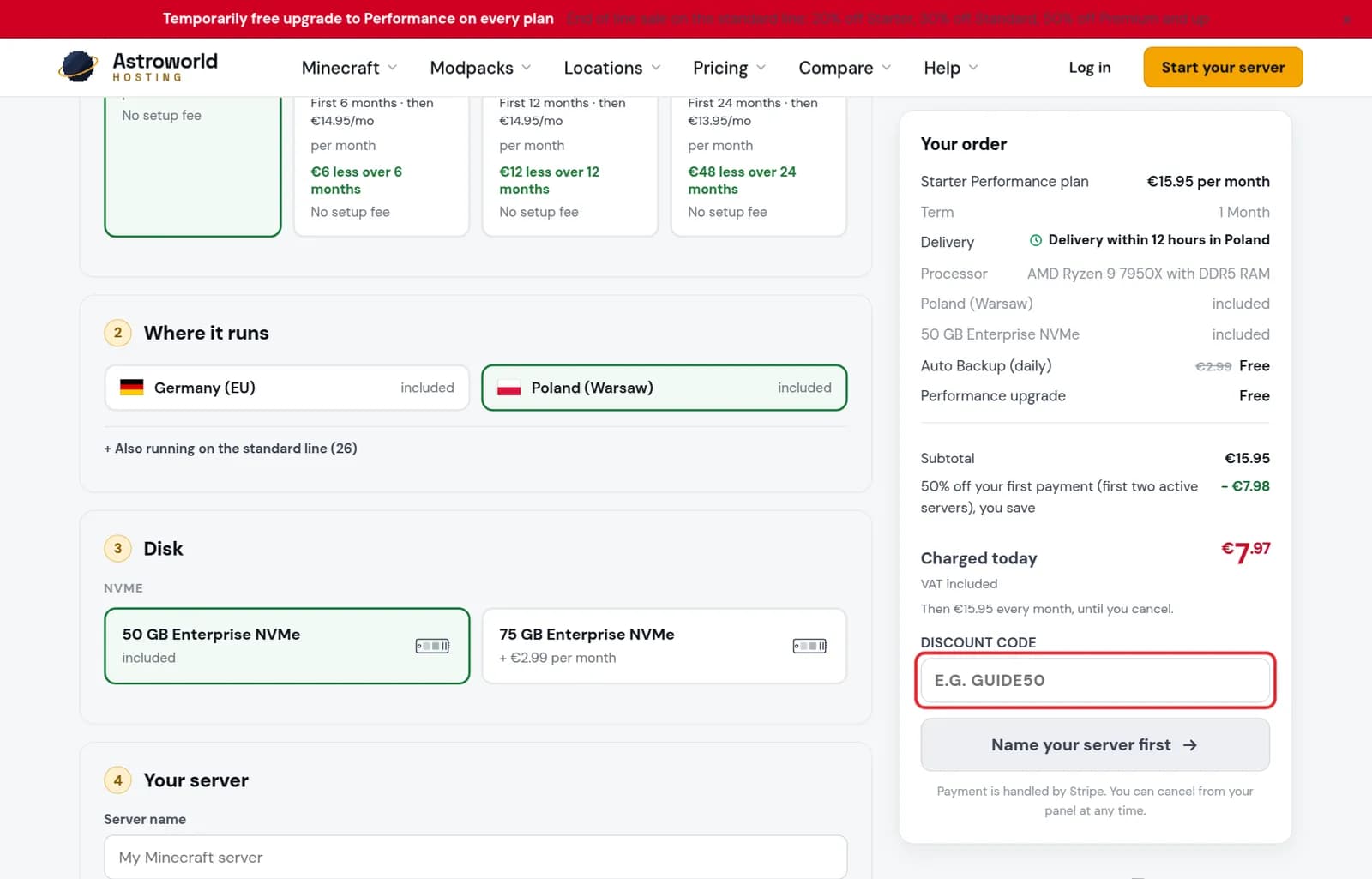
The Your order summary with the Discount code field marked in red Look at the line under the field. "Code applied" with an amount means it worked, and "Charged today" goes down by that amount. Then continue to payment as usual.
What the discount field can say
| What it says | What it means and what to do |
|---|---|
Code applied: €… off this payment. | The code is valid and the amount is taken off "Charged today". You can continue to payment. |
Your code is already applied: €… off this payment. | You arrived through a link that carried the code, so you do not need to type it. |
We do not know this code. Check the spelling, or leave it empty. | No valid code matches what you typed. Nothing is changed in the price, and you can still pay without a code. |
"We do not know this code"
Check the spelling, including numbers that look like letters. A code from a link is often applied already: the summary then says "Your code is already applied".
A code can also have expired. If a code you were given still does not work, ask us before you pay and we look it up.
Discounts you do not need a code for
Offers that apply to everyone, like a discount on your first payment or a sale on a size that is being retired, are already in the summary with their own line. You do not have to type anything for those.
Where codes come from
Codes come from us, for example in one of our guides, in a campaign, or from support after something went wrong on our side. A code only works on the order form of Astroworld Hosting; codes from other hosts or from game stores do nothing here.
One code per order
The field takes one code. If you have two, use the one that saves most on the plan and term you picked; the summary shows the amount after you type it, so you can try both before you pay.
Questions people also ask
Does the code apply to every renewal?
The summary says "off this payment", so the code is for the payment you are making now. The renewal line under "Charged today" shows what comes after it.
Can I add a code after I paid?
The field is on the order form only. Forgot it? Contact us with your order and the code, and we will see what we can do.
Can I combine a code with the welcome discount?
The summary shows every discount that applies on its own line, and "Charged today" adds them up. If a code cannot be combined with another offer, you see that in the amount before you pay.
Does a code work on a custom server from the configurator?
Type it in the same field of the order summary. Whether it applies depends on the code; the line under the field tells you straight away.