How do I open my server panel?
Short answerLog in, click your server on the dashboard and press "Open Panel". The panel is where you start and stop the server, see the console, change settings and install plugins or mods.
Open the panel
Log in. You land on the dashboard with your servers under "Your Servers".
Click the server you want to manage. Its page shows the plan, the region and the server address.
Press "Open Panel" under Server panel. If it says "Not available yet", the server is still being set up; that page refreshes by itself.
The panel opens on Overview: whether the server is up, how much memory and processor it uses, who is online and your play address with a copy button.
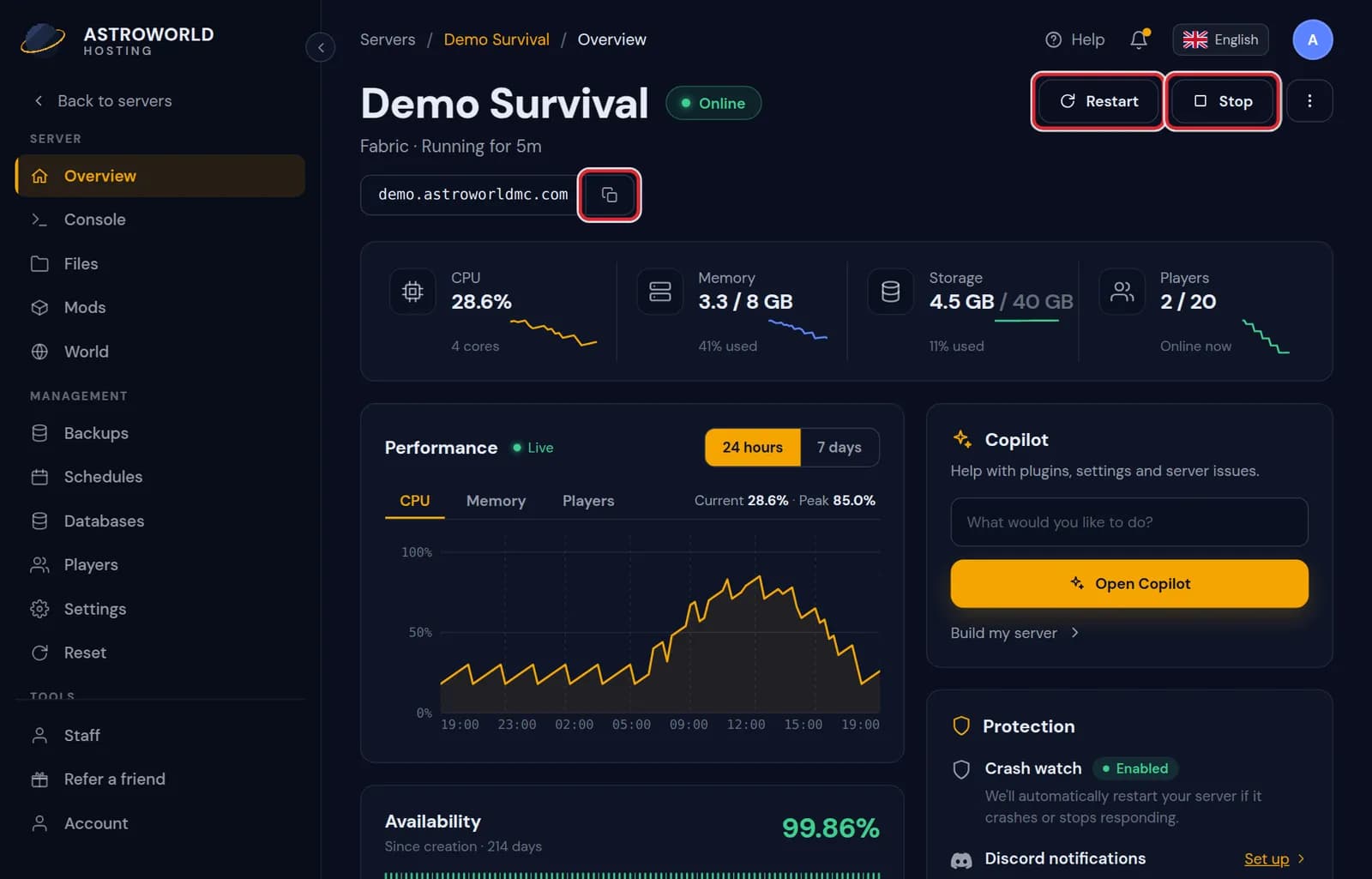
The Overview tab of the Astroworld server panel with status, resource use and the play address
What you can see on the dashboard and in the panel
| What it says | What it means and what to do |
|---|---|
Not available yet | Shown instead of "Open Panel" while a new server is still being set up. The page refreshes by itself; there is nothing you need to do. |
Your play address is being set up. It appears here as soon as it is live. | The server exists but its address is not live yet, which takes seconds to a few minutes after delivery. Refresh the Overview tab in a moment. |
Could not reach the panel. | Your browser lost the connection to the panel for a moment, for example after waking a laptop. Reload the page. If it keeps saying this, check the uptime page before anything else. |
Find your way around
The tabs on the left are the rest of the panel: Console, Files, Plugins or Mods, Settings, World, Backups, Schedules, Databases, Players and Staff. Your plan and your server type decide which ones you see.
What is on the Overview tab
The state of the server with the buttons to start, restart and stop it. Memory and processor right now and as graphs over the last day, the players who are online, and the traffic since the last start: down is what your server received from players, up is what it sent back. That counter goes back to zero on every restart.
Your play address sits at the top with a copy button, and on a crossplay server the Bedrock port is next to it. Further down are Crash Watch, which starts the server again within about half a minute if it stops on its own and emails you the last console lines, and the nightly restart, where you pick a quiet hour for the server to warn players, save and come back within a minute or two.
The panel speaks your language
The panel follows the language you pick, and besides English it is available in Dutch, German, Spanish, French, Polish, Russian and Turkish. Buttons, messages and explanations change with it; your server, its files and its commands stay exactly the same.
What changed and who did it
The Activity tab lists every start, stop, restart, file change and Copilot action with a time and the name of whoever did it. When something on the server changed and nobody remembers changing it, that list is the first place to look, especially once you have staff.
Questions people also ask
Can a friend open my panel too?
Yes, without your password. Invite them from the Staff tab and choose what they may do. They log in with their own account.
Is the panel the same as the dashboard?
No. The dashboard is your account: servers, invoices and your profile. The panel belongs to one server and is where you run it. Every server has its own panel, reached from the dashboard.
Can I open the panel on my phone?
Yes. It works in the browser of a phone or tablet, with the same tabs as on a computer, so you can check the console, add a player or restore a backup when you are away from your desk.
What is the difference between Stop and Kill?
Stop asks Minecraft to save the world and shut down cleanly. Kill pulls the plug: the world is saved only up to the last autosave. Use Kill only when a normal stop hangs.