How do I give someone access to my server panel?
Short answerOpen the Staff tab in your panel, press "Invite someone", type their email address, pick a role or tick the rights they may have and press "Send invite". They log in with their own account, and you can change or remove their access at any time.
Invite a staff member
Open your panel and go to the Staff tab.
Type their email address under "Invite someone".
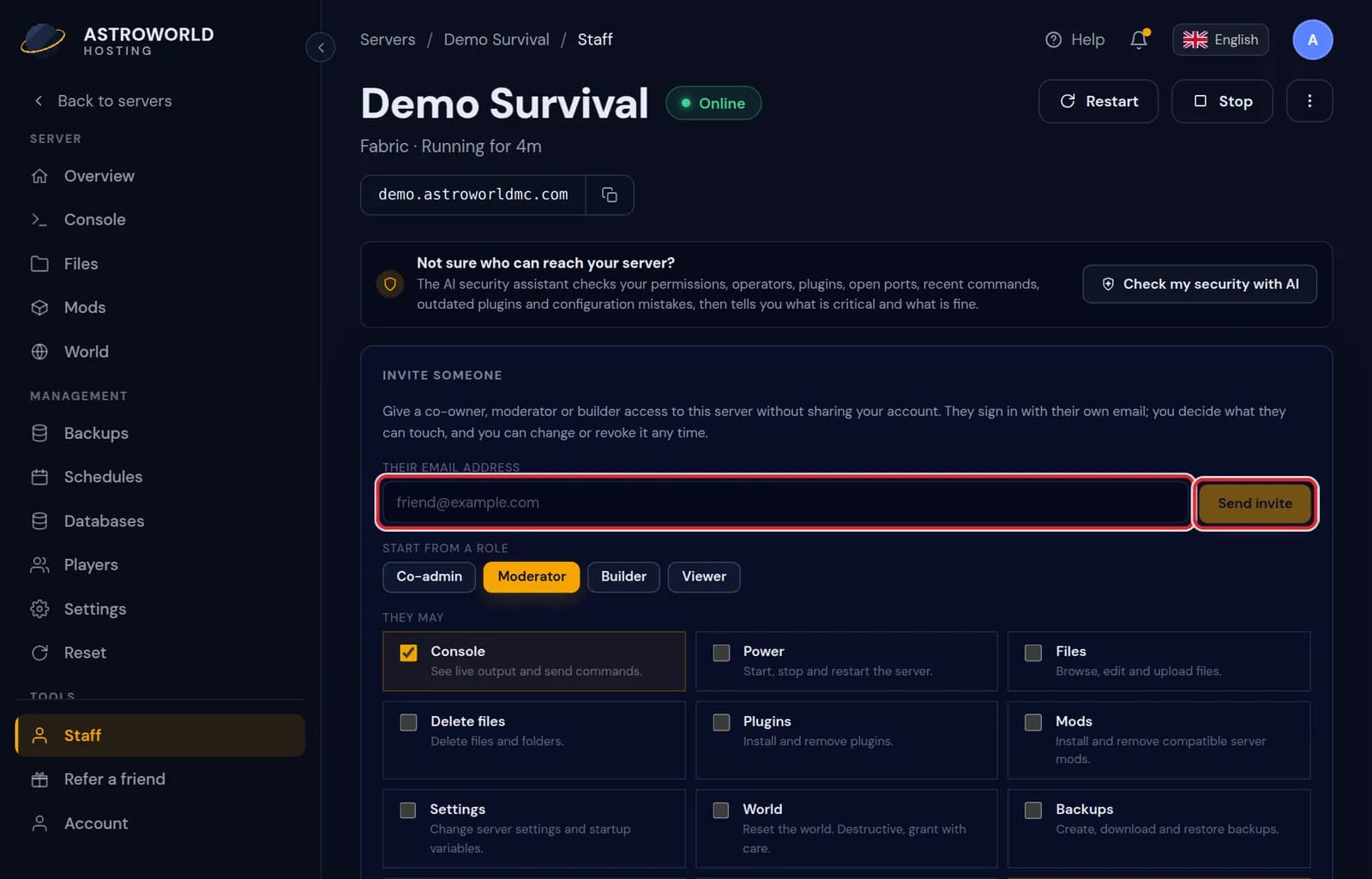
The Staff tab with the Invite someone form, role choice and rights Start from a role, or tick per right what they may do: the console, the files, the backups and so on.
Press "Send invite". They get an email; if they have no account yet, the invitation links itself to them when they sign up with that address.
Messages on the Staff tab
| What it says | What it means and what to do |
|---|---|
Pick at least one permission. | An invitation needs at least one right. Choose a role, or tick Activity if they may only look. |
Only the server owner can manage staff. | Someone with staff access tried to invite or change people. That stays with the owner, even for a Co-admin. |
Only the server owner can change executable server files. | Replacing plugin or mod files outside the catalogues stays with the owner, because such a file can run any code on the server. |
You do not have permission to control power on this server. | What your staff member sees when they try something their rights do not cover. Add the right on the Staff tab if they should have it. |
What always stays with you
Managing staff and anything to do with billing stay with you as the owner. Nobody you invite can invite others, widen their own rights or change your subscription.
Taking access back
Press "Remove" next to the person. They lose access to the panel straight away. What they already did on the server stays as it is, and you can invite them again later.
The four ready made roles
Co-admin gets everything except managing staff. Moderator gets the console, the players and the activity log, which covers day to day moderation. Builder gets the console, the files and the backups, so they can save their own work before a big change. Viewer only sees the activity log.
A role only ticks boxes for you. You can start from one and add or remove single rights, such as letting a moderator also restart the server.
The rights you can hand out
There are fifteen: console, power, files, deleting files, plugins, mods, settings, world, backups, schedules, databases, players, activity, the AI Copilot and the test copy of your server. Deleting files is separate from the files right on purpose, so a builder can upload and edit without being able to wipe a folder.
The rights that can undo the most are the world, deleting files, databases and power. The security check in the panel points out anyone who has them, so you can see at a glance who can do real damage.
Questions people also ask
Can I just share my login instead?
Please do not. With their own login you decide what they can touch, the activity log shows who did what, and you can remove one person without changing your password.
How many people can I invite?
Up to 15 people per server. The Staff tab shows how many have access right now.
Can I see what a staff member did?
Yes. The Activity tab lists every action with who did it and when, including file changes and restarts.
Does staff access cost anything?
No. Every plan can give up to 15 people access, each with their own login.