Modpack Server Hosting
Run RLCraft, ATM10, Pixelmon, Create, or any other modpack on hardware that can actually handle it. SSD storage on the standard line, Enterprise NVMe and a full thread each on the Performance line, and enough RAM to keep tick rates stable.

Why Modpacks Need Resources That Are Yours
A vanilla Minecraft server can run on 2 GB of RAM without breaking a sweat. Modpacks are a completely different story. When you load 150, 300, or 400+ mods into a single server, every part of the hardware gets pushed harder. The JVM needs more heap memory, the CPU spends more time on block interactions and entity AI, and the disk has to read and write larger chunk files every time a player explores new terrain.
Shared hosting plans that advertise “unlimited” RAM almost always oversell their nodes. Your server ends up competing with dozens of others for the same physical CPU and the same disk throughput. That is fine for a small Paper server, but modpacks punish it. You get lag spikes during world generation, freezes when players open large inventories, and TPS drops that make the game unplayable once a few people start automating things.
Memory that is yours solves the problem at the hardware level. When your server has 8 or 12 GB of RAM that belongs entirely to your instance, there is no neighbor to steal that memory from you. When storage is Enterprise NVMe, as on the Performance line, chunk generation and region file writes happen faster than the server can queue them. And when you have guaranteed vCPU cores, the tick loop stays at 20 TPS even when multiple players are exploring in different directions.
That is the approach we take at Astroworld. Every plan comes with a fixed amount of RAM that no other server on the node can touch, on shared cores with SSD storage on the standard line, or on the AMD Ryzen 9 7950X with DDR5 RAM or the AMD Ryzen 9 5900X and Enterprise NVMe on the Performance line. You also get full access to our own panel of our own build with a file manager, so uploading modpacks and adjusting server properties is straightforward. You do not have to upload one at all if you would rather not: the panel installs a whole modpack in one click from Modrinth, CurseForge or Feed The Beast, checks every jar it fetches, and switches the server to the right loader while it does it. A pack too large for a browser upload goes in by pasting its link and letting the machine fetch it itself.
Forge and Fabric Support
Most popular modpacks run on Forge, the mod loader that has been the standard since the early days of Minecraft modding. Forge handles the heavy lifting of loading hundreds of mods, resolving dependencies, and patching the base game code so that everything works together. RLCraft, All The Mods 10, Pixelmon, and Vault Hunters all use Forge.
Fabric is the newer alternative. It is lighter-weight and tends to load faster, but its mod ecosystem is smaller. Packs like Fabulously Optimized and some versions of Create use Fabric. If your pack ships with a Fabric server JAR, you can run it on any of our plans the same way you would run Forge.
Either way, the setup process is the same. Upload your server pack through the panel's file manager or via SFTP, set the correct startup JAR, and adjust the RAM allocation in the startup parameters. If you are new to modded servers, our modpack installation guide walks through every step.
RAM Recommendations by Modpack
RLCraft
6 - 8 GBHardcore survival with Lycanites Mobs, Ice & Fire, and punishing difficulty. Entity-heavy and needs solid RAM.All The Mods 10
8 - 12 GBKitchen-sink pack with 400+ mods spanning tech, magic, and exploration. Heavy world generation demands fast storage.Pixelmon
4 - 6 GBPokemon inside Minecraft. Custom structures, biome spawning, and battle mechanics on top of the base game.Create
4 - 6 GBMechanical engineering with gears, conveyors, and trains. CPU-intensive when contraptions get large.SevTech: Ages
6 - 8 GBProgression-based pack that locks content behind ages. Recipe changes and world-gen tweaks add to resource usage.Vault Hunters
8 GB+Dungeon-crawling RPG modpack with randomized vaults. Each vault generates fresh chunks, so storage speed matters.Two More Packs With a Page of Their Own
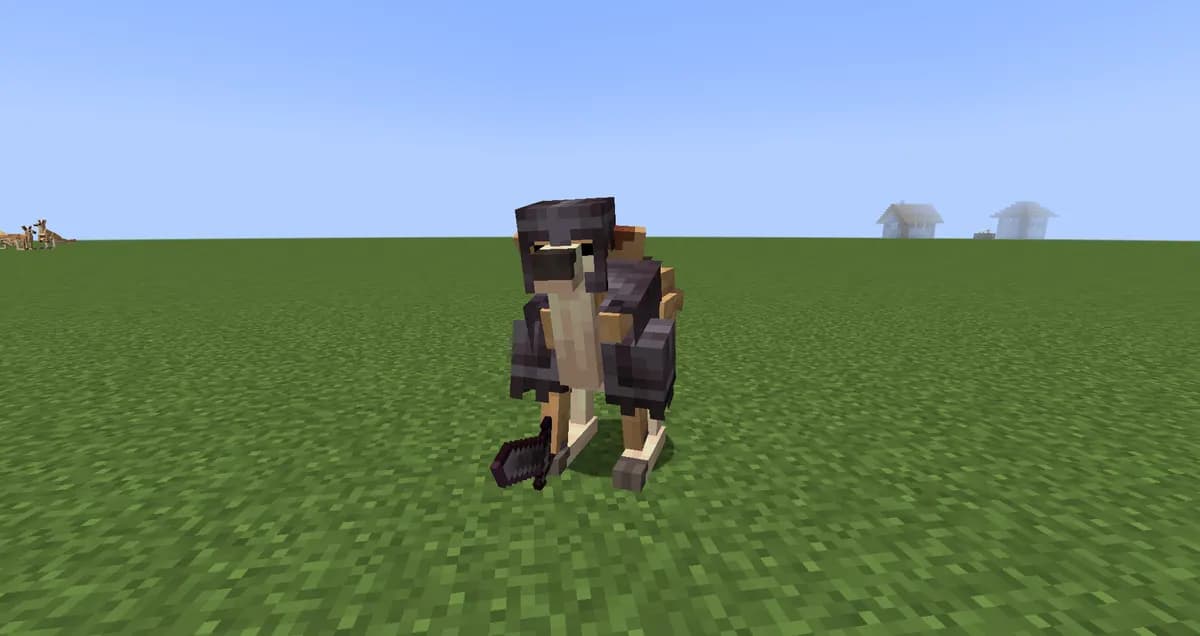
Better MC
6 to 12 GBBetter Minecraft on Forge 1.20.1, NeoForge 1.21.1 or Fabric. Adventure, structures and extra dimensions, so world generation is where the server works hardest.
GT New Horizons
6 to 15 GBThe long GregTech pack on Minecraft 1.7.10. Not on the one click installer, so its page walks through the setup in eight steps.Thirty-Two More Modpacks, Each With Its Own Page
From All the Mods 9 to Better OneBlock: every pack below has a page of its own with the mods we counted in its newest release, how much memory a group needs, and how the one click installer sets it up.

All the Mods 9
8 to 14 GBOver four hundred mods on Forge 1.20.1 and the ATM Star at the end. The load follows how much your group automates.
Cobblemon Official Modpack
3 to 6 GBThe official pack of the creature collecting mod, on Fabric 1.21.1. Light on the server; creatures in loaded chunks decide the size.
Craftoria
8 to 14 GBMore than five hundred mods on NeoForge 1.21.1, seasons and a long quest book. Heavy from day one.
Create: Above and Beyond
5 to 8 GBThe Create challenge pack from the author of Create, on 1.16.5, and its remaster CABIN on 1.20.1. A good first modded server.
Create: Astral
5 to 8 GBCreate on Fabric 1.18.2 with rockets, planets and cannons. A technical pack that runs lighter than its mod count.
DawnCraft
6 to 11 GBA souls-like RPG on Forge 1.18.2: Epic Fight combat, spells and bosses everywhere. Crowds and new chunks set the load.
Enigmatica 10
6 to 11 GBA curated tech and magic pack on NeoForge 1.21.1, a size lighter than the biggest kitchen sinks.
FTB Skies
6 to 11 GBFeed The Beast's skyblock, on NeoForge 1.21.1 or Forge 1.19.2. Little to generate, a lot to run once the island fills up.
MC Eternal 2
9 to 16 GBThe biggest pack we counted: 610 mods of tech, magic, colonies and dragons on Forge 1.20.1. Starts heavy.
Medieval MC
8 to 14 GBCastles, kingdoms, colonies and dragons on Forge 1.20.1, from the studio behind Better MC.
Prominence II
7 to 12 GBA story driven RPG on Fabric 1.20.1 with classes, a talent tree and bosses. Lighter on the server than its size.
SkyFactory
5 to 10 GBThe skyblock series that made the genre, in SkyFactory 5 on 1.20.1 and SkyFactory 4 on 1.12.2. Starts light.
FTB StoneBlock
6 to 11 GBSkyblock turned upside down: a world of solid stone, on NeoForge 1.21.1 or Forge 1.18.2.
Valhelsia 6
6 to 10 GBTech, magic, exploration and building on Forge 1.20.1, without a quest book. A moderate server.
Vault Hunters
6 to 12 GBAn action RPG inside Minecraft on Forge 1.18.2: vaults, levels, talents and 25 artifacts. Every vault is built on the spot.
SevTech: Ages
5 to 9 GBProgression locked behind ages, from stone tools to space, on Forge 1.12.2. Quiet early, busier in the industrial ages.
DeceasedCraft
7 to 12 GBZombie apocalypse in ruined cities on Forge 1.20.1, with firearms and hordes. City chunks and crowds set the size.
Cisco's Fantasy Medieval RPG
6 to 11 GBA medieval RPG with custom lore on Forge 1.19.2, in a full Ultimate edition and a lighter Lite one.
Roguelike Adventures and Dungeons 2
6 to 10 GBLevels, dungeons and a long list of dimensions on Forge 1.16.5, with RAD3 on 1.20.1. The load follows how far you roam.
Beyond Depth
8 to 14 GBChallenging exploration on Forge 1.20.1 with bosses and new places underground. No server pack, so configs go by hand.
Project Ozone 3
5 to 9 GBThe big 1.12.2 skyblock with a quest book and Kappa and Titan modes. Light world, heavy endgame.
Fear Nightfall
6 to 10 GBA co-op horror campaign on Forge 1.20.1, with a sanity meter and things in the dark. Nights are the busy part.
Craft to Exile 2
7 to 12 GBMinecraft played like Path of Exile, on Forge 1.20.1: rolled gear, maps and uber bosses. Busy maps are the heavy part.
Homestead
5 to 9 GBCozy farming, cooking and building on Fabric 1.20.1. A relaxed pack and a moderate server.
FTB Presents Direwolf20
6 to 11 GBThe sandbox pack from Direwolf20's series, on NeoForge 1.21.1 or the classic 1.12.2. No quests, just building.
RLCraft Dregora
6 to 10 GBRLCraft's brutal survival on Dregora, a custom world, on Forge 1.12.2. The world is what the server carries.
FTB OceanBlock 2
6 to 10 GBFeed The Beast's survival on an endless ocean, NeoForge 1.21.1. Cheap to generate, busy once the base fills up.
Life in the Village 3
6 to 10 GBA low tech, vanilla plus pack built around MineColonies, on Forge 1.19.2 with LITV4 on 1.20.1. Colonies set the size.
Create: Arcane Engineering
5 to 9 GBCreate with Ars Nouveau magic in one recipe chain, on Forge 1.18.2. Finished, stable and light to host.
Cottage Witch
6 to 10 GBA cozy vanilla++ pack with witchcraft, herbs and furniture, on Forge 1.19.2. Calm day to day, heavier while exploring.
Monifactory
6 to 12 GBA long GregTech factory pack on Forge 1.20.1, reimagining Nomifactory. Light start, heavy late game.
Better OneBlock
4 to 7 GBA single block in the void, on Fabric 1.21.1 and close to vanilla. One of the lightest packs to host.| Modpack | Minecraft | Loader | Mods | Memory |
|---|---|---|---|---|
| All the Mods 9 | 1.20.1 | Forge | 432 | 8 to 14 GB |
| Cobblemon Official Modpack | 1.21.1 | Fabric | 73 | 3 to 6 GB |
| Craftoria | 1.21.1 | NeoForge | 522 | 8 to 14 GB |
| Create: Above and Beyond | 1.16.5 | Forge | 136 | 5 to 8 GB |
| Create: Astral | 1.18.2 | Fabric | 197 | 5 to 8 GB |
| DawnCraft | 1.18.2 | Forge | 298 | 6 to 11 GB |
| Enigmatica 10 | 1.21.1 | NeoForge | 312 | 6 to 11 GB |
| FTB Skies | 1.21.1 | NeoForge | 433 | 6 to 11 GB |
| MC Eternal 2 | 1.20.1 | Forge | 610 | 9 to 16 GB |
| Medieval MC | 1.20.1 | Forge | 456 | 8 to 14 GB |
| Prominence II | 1.20.1 | Fabric | 443 | 7 to 12 GB |
| SkyFactory | 1.20.1 | Forge | 293 | 5 to 10 GB |
| FTB StoneBlock | 1.21.1 | NeoForge | 411 | 6 to 11 GB |
| Valhelsia 6 | 1.20.1 | Forge | 279 | 6 to 10 GB |
| Vault Hunters | 1.18.2 | Forge | 168 | 6 to 12 GB |
| SevTech: Ages | 1.12.2 | Forge | 254 | 5 to 9 GB |
| DeceasedCraft | 1.20.1 | Forge | 306 | 7 to 12 GB |
| Cisco's Fantasy Medieval RPG | 1.19.2 | Forge | 288 | 6 to 11 GB |
| Roguelike Adventures and Dungeons 2 | 1.16.5 | Forge | 284 | 6 to 10 GB |
| Beyond Depth | 1.20.1 | Forge | 478 | 8 to 14 GB |
| Project Ozone 3 | 1.12.2 | Forge | 261 | 5 to 9 GB |
| Fear Nightfall | 1.20.1 | Forge | 273 | 6 to 10 GB |
| Craft to Exile 2 | 1.20.1 | Forge | 397 | 7 to 12 GB |
| Homestead | 1.20.1 | Fabric | 340 | 5 to 9 GB |
| FTB Presents Direwolf20 | 1.21.1 | NeoForge | 268 | 6 to 11 GB |
| RLCraft Dregora | 1.12.2 | Forge | 214 | 6 to 10 GB |
| FTB OceanBlock 2 | 1.21.1 | NeoForge | 309 | 6 to 10 GB |
| Life in the Village 3 | 1.19.2 | Forge | 282 | 6 to 10 GB |
| Create: Arcane Engineering | 1.18.2 | Forge | 197 | 5 to 9 GB |
| Cottage Witch | 1.19.2 | Forge | 372 | 6 to 10 GB |
| Monifactory | 1.20.1 | Forge | 220 | 6 to 12 GB |
| Better OneBlock | 1.21.1 | Fabric | 185 | 4 to 7 GB |
Every Pack on This Page, Side by Side
| Modpack | Memory | Loader | Smallest plan that fits |
|---|---|---|---|
| RLCraft | 6 - 8 GB | Forge | Starter (8 GB) |
| All The Mods 10 | 8 - 12 GB | NeoForge | Standard (12 GB) |
| Pixelmon | 4 - 6 GB | Forge | Starter (8 GB) |
| Create | 4 - 6 GB | Forge or Fabric | Starter (8 GB) |
| SevTech: Ages | 6 - 8 GB | Not documented here | Starter (8 GB) |
| Vault Hunters | 8 GB+ | Not documented here | Starter (8 GB) |
Questions About Modpack Servers
How far apart are these packs in memory?
Further than most people expect. Pixelmon is listed at 4 - 6 GB and All The Mods 10 at 8 - 12 GB, and the plan that covers the first one is Starter while the second needs Standard. Picking by pack rather than by habit is the whole reason the table is there.
Does giving a modpack more RAM make it run faster?
Only up to the point where it stops running out. Past that, memory does nothing for the tick rate: a pack that drops TPS because hundreds of machines are working every tick needs processing time, not more gigabytes.
My pack is not in this list. What now?
Look at what the pack itself recommends and match that against the memory column here. The numbers on this page are the ones we host these packs on; a pack of comparable size behaves comparably.
Can I move to a bigger plan once the pack grows?
Yes, and that is the usual path with a kitchen-sink pack. The list runs from Mini at 4 GB up to Dedicated at 96 GB, so there is room above whichever tier you start on.
Plans start at 4 GB of RAM on Mini and scale up to 96 GB on Dedicated. Pick the one that matches your modpack and your player count.
Written and checked by the Astroworld Hosting team. Last reviewed on 6 September 2026.
Delivery: most servers are handed over instantly and run within seconds of payment, the rest follow within 60 minutes during the day and within 12 hours at night.