Minecraft hosting guide
Change your Minecraft version, or your whole server type
Both live on the Settings tab of your server, and both are things a lot of hosts still ask you to open a ticket for. Type a version and restart, or move a running server between 6 types with the world, the settings and the play address it already had. The matching Java is picked for you, and nothing on your disk is deleted on the way.
The short answer
Change the version
Settings tab, one field, restart. The Java runtime moves with it, you never pick it.
Switch the type
One button, four steps behind it, between all 6 types. World, settings and address stay.
The expensive direction
Down a version, or from a modded type to a plugin one. The panel backs up first and tells you what goes.
Both jobs step by step below, the Java table, and what survives every switch.
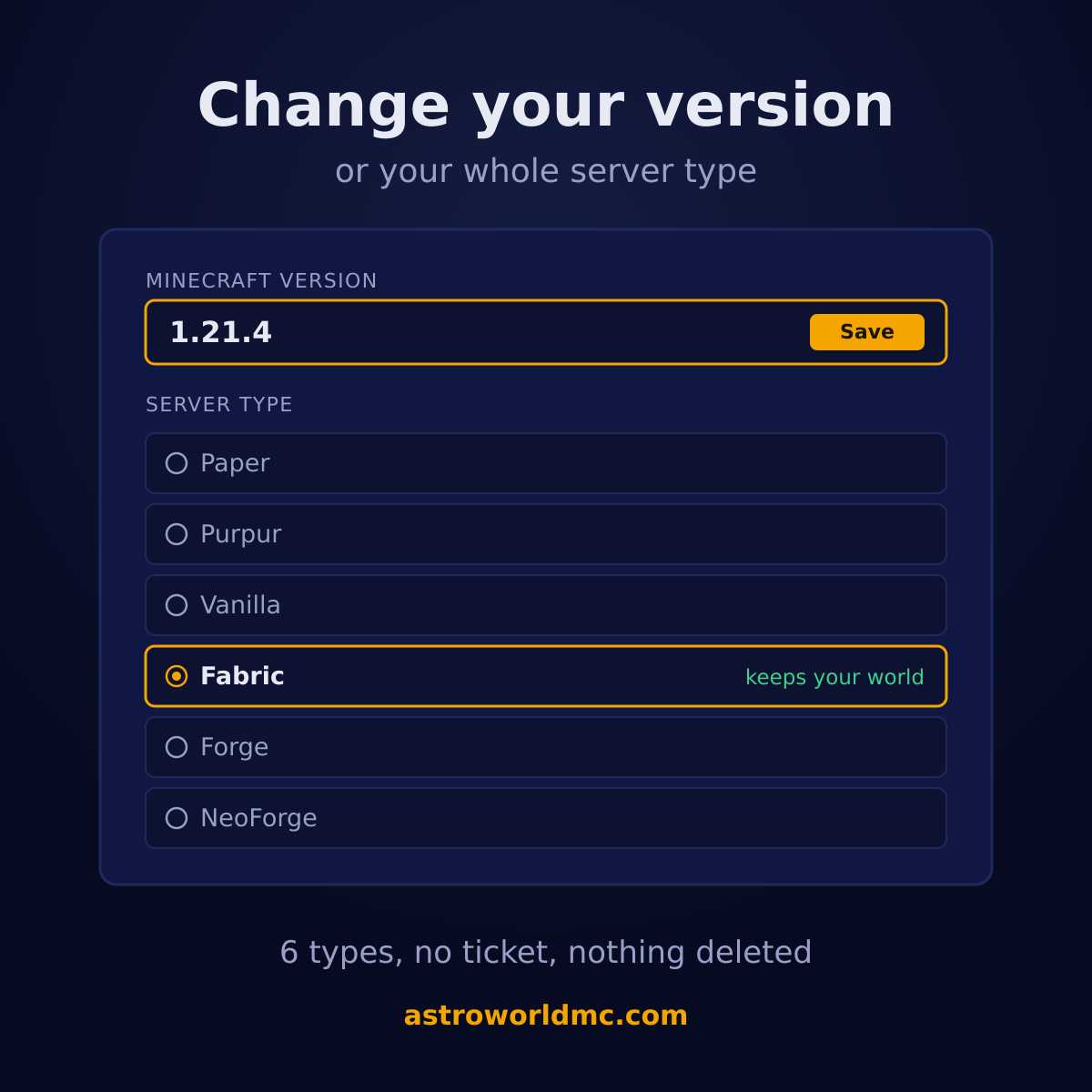
Two changes, one tab, two very different jobs
Changing the version keeps your software and moves the game forward. Switching the type keeps the game and changes the software underneath it. People mix them up constantly, and the mix up is expensive in one direction only: a version change is a restart, a type switch decides whether your plugins or your mods get read tomorrow.
So they behave differently on purpose. The version is a field you fill in and save with everything else on that screen. The type is a handful of steps the panel walks through by itself, with a backup in the middle of it that it will not skip.
Which Java version each Minecraft version needs
This is the table that costs people an evening somewhere else. The game refuses to start on a runtime that is too old and prints the requirement in the console, which is helpful only once you know where to change it. Here you never change it: the number you type decides the runtime, and this is the mapping it uses.
| Minecraft version | Java it gets | What that range is |
|---|---|---|
| 26.1 and newer | Java 25 | The new year based numbering. These releases refuse to start on anything older and say so in the console. |
| 1.20.5 through 1.21.x | Java 25 | The long lived generation most plugins and most modpacks are still built for. |
| 1.18 through 1.20.4 | Java 17 | The caves and cliffs era. 1.20.5 is where the requirement moves up, not 1.21. |
| 1.17 | Java 16 | One version, one runtime of its own. It is the only release that sits alone. |
| 1.16.5 and older | Java 8 | Everything back to the old versions people still run for a specific plugin or a specific map. |
| latest | Java 25 | Leaving it on latest means the newest release, so it gets the runtime the newest release needs. |
A runtime that is newer than the game needs is almost never a problem. One that is older always is, so where the two rules meet we take the higher one. That is the whole policy, and it is the reason the first order on the newest release does not sit there failing to boot.
The newest release is 26.3, Wilderness Bound, out since 15 September 2026, and it runs on Java 25 like the rest of the 26 line. What it changes on a server, and whether Paper and your plugins are ready for it yet, is on Minecraft 26.3 on your server.
How to change the Minecraft version
Open Settings on your server
The Minecraft version sits in the same screen as your server name and your restart schedule, near the top. You are looking at the version your server is set to, which is not always the version it is running: a server left on latest reports whatever it started with the last time it booted.
Type latest, or an exact release
The field takes the word latest or a real release number, for example 1.21.4 or 26.2. Anything else is refused before it reaches your server, because a version that does not exist gives you a container that downloads nothing and a console full of the same line.
Save, from the one bar at the bottom
This screen has a single save bar for everything on it, so the version goes along with whatever else you changed. It tells you exactly what it saved, and which of those changes need a restart before they count.
Restart, and watch the console
The new files are fetched when the server next starts, so the first boot after a version change takes longer than usual and the console is where you see it happen. Nothing is deleted along the way: your world, your settings and your files are exactly where you left them.
Every server type you can switch to, all 6 of them
Every one of these runs on every plan. There is no tier that unlocks modded hosting here and no surcharge for picking the heavier one, so the only thing that decides is what you want to run.
| Server type | What it is |
|---|---|
| PaperRuns plugins | The usual choice, and the one most servers end on: vanilla gameplay, every Bukkit and Spigot plugin, and years of performance work underneath it. |
| PurpurRuns plugins | Paper with hundreds of extra gameplay switches on top. Anything that runs on Paper runs here, so it is the one switch that changes nothing about your content. |
| VanillaRuns neither | The game exactly as Mojang ships it, with no plugins, no mods and no extra settings. Slower with a lot of players, and the only type that is guaranteed to behave like single player. |
| FabricRuns mods | The light modloader. Most performance mods and a large part of the modern packs are built for it, and it is usually the first loader to be ready for a new Minecraft release. |
| ForgeRuns mods | The old modloader, and still where the big packs live. All the Mods, Valhelsia and most of what people mean by a modpack are Forge. |
| NeoForgeRuns mods | The continuation of Forge for 1.20.2 and newer. Mods for those versions increasingly land here first, and Forge mods for older versions stay on Forge. |
2 of them run Bukkit plugins, 3 run mods, and Vanilla runs neither because that is the point of it. If you are still choosing rather than switching, the server types comparison goes through them one at a time.
How to switch server type, in the four steps the panel takes
You pick a type and press one button. These are the steps it runs behind that button, and the order is the safety: every one of them exists because doing it in a different order breaks something that is hard to get back.
Stopping the server
The panel does this for you and waits until the container is really offline. A conversion over a running server writes the old files back over the new ones on shutdown, and what you get is a server that starts on neither type.
Making a backup
A fresh backup is taken and named after the switch you asked for, so you can find it back a week later without guessing. This is not a formality: it is the difference between changing your mind and losing an afternoon.
Waiting for the backup to finish
A backup that has started is not a backup. The panel waits until it reports back as finished and successful, up to twenty minutes for a big world, and it says so on the button while it waits. If the backup fails, nothing is changed at all.
Switching the server type
Only now does the type change, and the memory your plan pays for is written along with it. That last part matters more than it sounds: a converted server that is handed the stock allowance instead of its own comes back smaller than the one you bought, and you would only find out under load, on a full server, on a Saturday.
What stays exactly as it was
A conversion swaps the server software and the startup line. The disk is yours, not the software's, so this list survives every switch in every direction.
- Your world, including every player's inventory, position and progress.
- server.properties and every setting you made in the panel.
- Your play address, your port and all of your backups.
- Everything else on the disk, down to the files the new type cannot read.
That last one is the one worth reading twice. We do not clean up the files the new type cannot read, and that is deliberate: they are what makes going back possible. Whether to throw them away is your call, once you have seen for yourself that you are staying.
What actually changes, per direction
The panel shows you this before you confirm, and it is the same text you are reading now. It is here as well because the honest version of it belongs on the page you read before you buy, not only in the dialog you get after.
| Switching | What you will notice |
|---|---|
| Plugins to modsPaper or Purpur to Fabric, Forge or NeoForge | Bukkit plugins stop being loaded. The files stay in your plugin folder and every setting a plugin wrote stays with it, but nothing reads them, so everything a plugin did for you stops at once: permissions, homes, shops, claims and protection, the economy. That is the single biggest surprise in this whole page, and it is also completely reversible. Switch back and all of it returns exactly as it was. |
| Mods to pluginsFabric, Forge or NeoForge to Paper or Purpur | Mods stop being loaded, and the files stay in your mod folder untouched. Blocks and items that came from a mod are still written into your world, but the game no longer knows what they are, so they show up as missing rather than quietly vanishing. Switching back makes them all real again, which is why we do not tidy anything away. |
| One modloader to anotherFabric to Forge, Forge to NeoForge | Mods built for the old loader do not load on the new one: a Fabric mod is not a Forge mod, whatever the file looks like. A modpack in particular is built for exactly one loader, so switching the loader underneath a pack that is already installed breaks the pack rather than moving it. Install the pack for the new loader afterwards and you are where you meant to be. |
| Between Paper and PurpurBoth run the same plugins | Nothing about your content changes: both run the same plugins, read the same configuration and behave the same way to a player. Purpur is Paper with hundreds of extra gameplay switches added, so this is the one conversion where the only thing you gain is more settings to leave alone. |
What the panel refuses to do
Five refusals, and every one of them is a mistake somebody has already made somewhere. They are not there to slow you down, they are there so a bad afternoon stays an afternoon.
| What it refuses | Why it refuses |
|---|---|
| Converting while it runsStop it first | The old software writes its own files back when it shuts down, straight over the new ones. What comes back up starts on neither type, and the fix for that is the backup you were about to make anyway. |
| Converting without a finished backupLast day, and completed | A backup that has been started is not a backup. It has to report back finished and successful, and from the last day, before the type is allowed to change. The only way past it is a plan with no backup slots at all, and then you have to tick a box saying you know. |
| Deleting files the new type cannot readNever, in any direction | Plugin files on a modloader and mod files on Paper are simply not read. We leave every one of them exactly where it is, because that is what makes going back a decision instead of a rebuild. Throwing them out is your call, later, once you have decided to stay. |
| Changing your play addressAdded to, never replaced | Your address, your port and your backups come through every conversion untouched. Nobody has to be told a new one, and nothing that was written down somewhere stops working. |
| Your staff and the rights you gave themKept, because they are not on the machine | The people you invited and the rights you ticked for each of them live with us and not inside the container, so a conversion cannot touch them. Everybody keeps the tabs they had, nobody has to be invited again, and the one thing that does change is what there is to press: a modloader has Mods where Paper had Plugins, and whoever had that right has it on the new one. |
None of these can be argued with from the screen, and that is on purpose: they are enforced on our side, not drawn as a warning you can click past. The same goes for the rest of what the panel will and will not let you do, where every refusal is a thing that has gone wrong for somebody at least once.
Questions about changing your version or server type
How do I change the Minecraft version of my server?
Open Settings on your own server in the panel, type latest or an exact release such as 1.21.4 in the Minecraft version field, save, and restart. The new files are fetched on that next start. There is no ticket, no waiting for us and no file for you to go and find yourself.
Do I have to pick a Java version as well?
No, and that is the part people lose an evening to elsewhere. The runtime follows the version you typed: Java 25 for 26.1 and newer, Java 25 for 1.20.5 through 1.21.x, Java 17 for 1.18 through 1.20.4, Java 16 for 1.17, and Java 8 for anything older than that. A game that is newer than its runtime does not start and prints the requirement in the console, which is a useful message only once you know where the setting lives. Here you never need to know.
Will I lose my world if I change the version?
No. Only the server files are replaced. Your world, your server settings, your player data and everything else on the disk stay untouched, and your address and your backups stay with you too. One thing to know is that Minecraft upgrades a world when you move it forward and never moves one back down, so going to an older version afterwards is a job for a backup rather than a second version change.
Can I switch from Paper to Fabric without starting over?
Yes. The panel stops the server, takes a backup, waits until that backup has really finished and only then converts it, and your world comes back with every player exactly where they logged off. Your plugin files are not deleted either, they are simply not read by a modloader, so switching back hands all of them straight to you again.
Which server types can I switch between?
All 6 of them, in any direction: Paper, Purpur, Vanilla, Fabric, Forge and NeoForge. 2 of those run Bukkit plugins, 3 run mods, and Vanilla runs the game exactly as Mojang ships it. Every type is on every plan, so there is no tier here that unlocks modded hosting and no surcharge for the heavier ones. If you are still choosing rather than switching, the comparison of the server types goes through them one at a time.
Why does it insist on a backup before switching type?
Because without one, changing your mind is not a decision but a hope. A finished, successful backup from the last day is required before the type changes, and if your plan has no backup slots at all you have to tick a box saying you understand you are going without. It is the same rule the world reset uses, learned the same way, and getting one back afterwards is a couple of clicks.
Should I leave the version on latest?
It depends on what you install. On latest your server follows the newest release, which is fine for a vanilla server or a lightly modded one. The plugin and mod installers do want an exact number though: they offer only stable builds made for exactly the version you are on, and they ask you to pin one first rather than guess on your behalf. A pinned version is also what stops a modpack from breaking underneath you on a Tuesday.
What happens to my mods after a version change?
They stay on the disk and they are still loaded, which is exactly the problem: a mod built for the old version running on the new one is the usual reason a server stops booting after an upgrade. The panel checks what it installed for you against what exists now and tells you which files are behind. For a file somebody uploaded by hand it says the origin is unknown instead of guessing from the name, because offering an update for the wrong project is worse than offering none. Reinstalling the pack for the new version is the clean way out.
How long is my server down for?
A version change costs one restart plus the download, so usually a couple of minutes. A type switch takes longer because of the backup in the middle of it, and a large world can push that towards twenty minutes. Both are things you do on purpose at a moment you choose, which is the real difference with waiting on a ticket.
Can I switch back if I do not like it?
Yes, the same way, as often as you like. Nothing is removed on the way out, so the files the old type needs are still sitting there waiting for it, and going back is the same four steps in the other direction. That is the entire reason we refuse to tidy up the files the new type cannot read.
Where to find it
Both of these are on the Settings tab of your own server in the panel, on every plan, with nothing to order and nothing to enable. Every rule on this page is the rule the panel really applies, down to which Java it picks for which version, so you can read what will happen before you decide anything. One thing we will not dress up: there is a demo of the panel, a sandbox copy anyone here would reasonably want to try, and today it opens for our own operators only. A person who clicked through would land on a login asking for an account, so rather than send you to a door like that we would rather this page did the looking for you: every rule on it is the rule the panel really applies, so you can look around it here instead of trying to guess. Six questions will put one plan in front of you rather than a price list to work through on your own.
Answer six questions and get one plan Everything the panel does Compare Paper, Fabric, Forge and Vanilla Your play address, and adding more Staff permissions, right by right How the nightly backups work How to restore a backup Installing a modpack after switching Ask the AI Copilot to do it with you View plans and prices
The 6 server types and the Java mapping on this page are read from the panel's own code when the page is built, so they cannot drift away from what your server actually gets. Written 30 August 2026.
Written and checked by the Astroworld Hosting team. Last reviewed on 6 September 2026.
Delivery: most servers are handed over instantly and run within seconds of payment, the rest follow within 60 minutes during the day and within 12 hours at night.