Pay for twenty-four months and save 17% or moreOn every plan, pick the 24-month term when you order
Skip to main content

Minecraft Java Edition Server Hosting

Java Edition runs on a JVM you control. You pick the server build and the release yourself, load the plugins or mods you want, and we put it in the region closest to your players.

  • 7 server builds, picked at checkout
  • Releases back to 1.8.9
  • 4 GB up to 96 GB of RAM
Two Minecraft characters mid stride with a pig walking between them. The one in front swings a diamond pickaxe up over his shoulder towards the text, the other holds an iron sword out at her side and looks his way.

Choose your Minecraft server plan

Pick the memory that fits what you run, everything else is the same on every plan. All prices include VAT. How much RAM do I need?

NVMe storagethe standard disk
DDoS protectionincluded, no extra cost
27 locationsyou pick before you pay
Our own panelcustom built, tailored to your server
A cobblestone block, the icon of the Mini Minecraft server plan

Mini Plan

4 GB RAM

Temporarily 6 GB and 4 vCPU in some locations, at no extra cost

Lightweight survival or creative with friends

  • 80 GB SSD
  • 2 vCPU
  • 1 to 5 players recommended
  • Built-in AI Copilot for Java
  • DDoS Protection+ on port 25565
  • Free Java subdomain
  • Widely available, 27 locations
  • See everything in this plan
From
6,998,49per month
Incl. VAT
Order
A block of coal, the icon of the Starter Minecraft server plan

Starter Plan

8 GB RAM

Medium modpack (100-200 mods)

  • 80 GB SSD
  • 4 vCPU
  • 5 to 20 players recommended
  • Built-in AI Copilot for Java
  • DDoS Protection+ on port 25565
  • Free Java subdomain
  • Widely available, 27 locations
  • See everything in this plan
From
8,7910,99per month
Incl. VAT
Order
Most picked
A block of iron, the icon of the Standard Minecraft server plan

Standard Plan

12 GB RAM

Heavy modpack (300+ mods)

  • 200 GB SSD
  • 6 vCPU
  • 20 to 50 players recommended
  • Built-in AI Copilot for Java
  • DDoS Protection+ on port 25565
  • Free Java subdomain
  • Widely available, 27 locations
  • See everything in this plan
From
13,5916,99per month
Incl. VAT
Order
A block of gold, the icon of the Premium Minecraft server plan

Premium Plan

24 GB RAM

A heavy modpack with a full server on it

  • 400 GB SSD
  • 8 vCPU
  • 50 players and up recommended
  • Built-in AI Copilot for Java
  • DDoS Protection+ on port 25565
  • Free Java subdomain
  • Widely available, 27 locations
  • See everything in this plan
From
23,9929,99per month
Incl. VAT
Order
A block of diamond, the icon of the Ultimate Minecraft server plan

Ultimate Plan

48 GB RAM

Several worlds, or a lobby with two servers

  • 500 GB SSD
  • 12 vCPU
  • 50 players and up recommended
  • Built-in AI Copilot for Java
  • DDoS Protection+ on port 25565
  • Free Java subdomain
  • Widely available, 27 locations
  • See everything in this plan
From
39,9949,99per month
Incl. VAT
Order
A block of emerald, the icon of the Enterprise Minecraft server plan

Enterprise Plan

64 GB RAM

A network of servers behind one address

  • 600 GB SSD
  • 16 vCPU
  • 100 players and up recommended
  • Built-in AI Copilot for Java
  • DDoS Protection+ on port 25565
  • Free Java subdomain
  • Widely available, 27 locations
  • See everything in this plan
From
67,9984,99per month
Incl. VAT
Order
A block of netherite, the icon of the Dedicated Minecraft server plan

Dedicated Plan

96 GB RAM

The largest thing we host on one machine

  • 700 GB SSD
  • 18 vCPU
  • 100 players and up recommended
  • Built-in AI Copilot for Java
  • DDoS Protection+ on port 25565
  • Free Java subdomain
  • Widely available, 27 locations
  • See everything in this plan
From
87,99109,99per month
Incl. VAT
Order
Memory (RAM)8 GB
1 GB8 GB16 GB32 GB64 GB96 GB
vCPU4
Storage (NVMe SSD)80 GB
Locations27
A Minecraft world seen from a hill, the artwork for Java Edition hostingNeed help choosing?Answer four questions and we work out which step fits your world.Get recommendation
Starting at11,99 14,99Incl. VAT
Start building

Not sure which one? Answer four questions and we pick it for you.

Cancel Java hosting anytime

Java Edition server hosting with no contract: end renewal from your dashboard and cancel at least 3 days before the next billing date to avoid that charge. Your world, your plugins and your server jar stay downloadable.

Java costs shown upfront

Your Java plan, the location, storage add-ons and any setup fee are listed before checkout. Paper, Purpur, Spigot, Fabric, Forge, NeoForge and Vanilla all cost the same here, and DDoS protection, a free subdomain and the AI Copilot are included with every Java Minecraft server.

Upgrade without moving your world

Support adds RAM, vCPU or NVMe and SSD storage without downtime, so a modpack that outgrew 8 GB keeps its world, its plugins folder and its IP address. Java modpack hosting scales up to 96 GB on one machine.

Free subdomain

Your server gets a name, not an IP — free subdomain included

Every server here comes with a free address under mc.astroworldmc.com. Your players type a name instead of a number, the port disappears, and the machine your world actually runs on stays out of sight. Change plan, change region, move to another node: the address stays the same, so you never have to tell anyone a new one.

Repair & Name
8/24
Every other host203.0.113.47:25731
Name tagsurvival
Your addresssurvival.mc.astroworldmc.com
Cost: 0 levelsIncluded on every plan, on every term

Free, and yours from the first minute your server is online.

Add Server
Server Name
Survival
Server Address
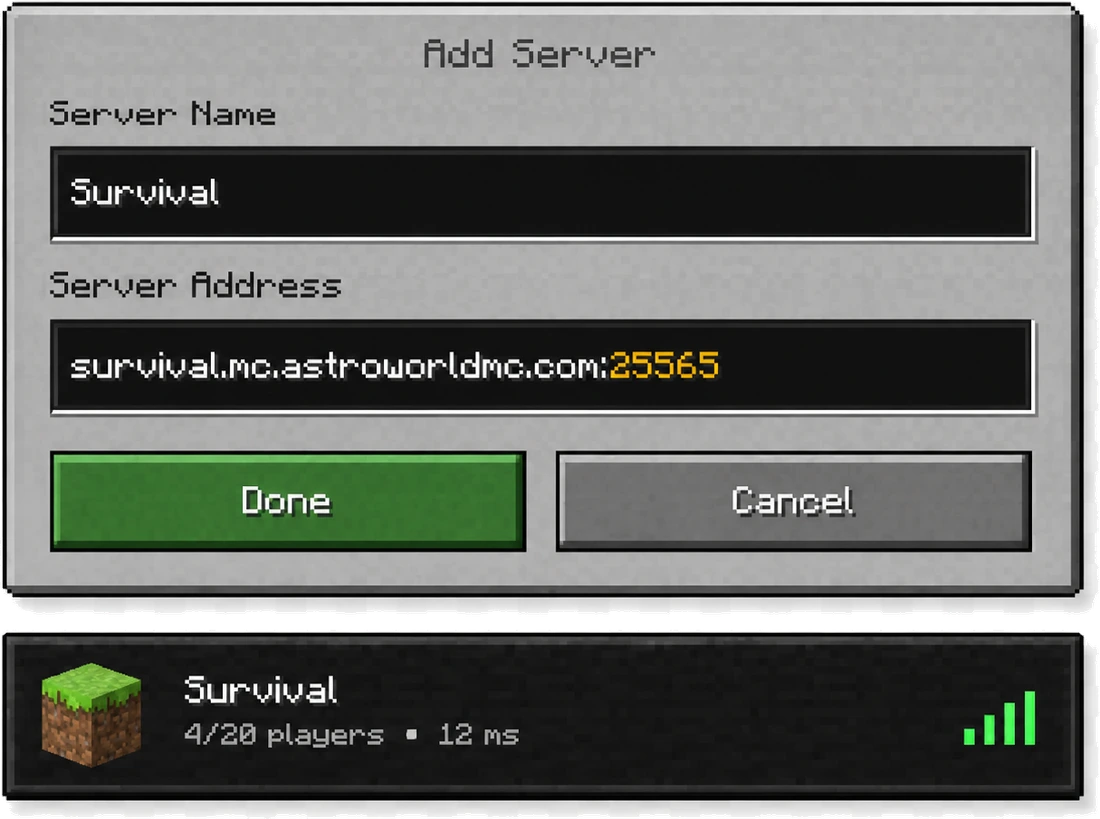
survival.mc.astroworldmc.com
DoneCancel

This is the screen your players fill in. One line, no port, no numbers.

Server software

The Software That Runs on Java

Plugins and mods are a Java thing. Our checkout offers 7 pieces of software to boot your server with, and every one of them is a Java build. Five of them are the ones people actually ask for; Spigot and NeoForge round out the list for servers that need them. Whichever you take, it costs the same and runs on the same hardware, so the choice is about what you want to install, not about what the plan costs. You can swap it later without losing the world.

  • Paper, one of the 7 server builds you can boot a Minecraft Java server with here

    The option our checkout marks as recommended. It reads the Bukkit and Spigot plugin API, so every permissions, economy or land claim plugin you find loads on it. It is also the usual base when Bedrock players have to reach the same world.

    Paper hosting, in detail
  • Purpur, one of the 7 server builds you can boot a Minecraft Java server with here

    A Paper fork whose configuration turns gameplay itself into settings: rideable dolphins, phantoms you can switch off, mob behaviour you can retune, all without writing a plugin. It has no page of its own here yet, it sits in the software list at checkout as its own entry.

  • Fabric, one of the 7 server builds you can boot a Minecraft Java server with here

    Reaches a new Minecraft release earlier than any other loader, usually within days. Pick it when you want a handful of optimisation or quality of life mods rather than a whole tech tree.

    Fabric hosting, in detail
  • Forge, one of the 7 server builds you can boot a Minecraft Java server with here

    The loader underneath the heavy packs. RLCraft, Pixelmon and Create all run on it, and All The Mods 10 has moved on to NeoForge, which checkout lists separately. These are the servers that reach for the memory at the bottom of the table below.

    Forge hosting, in detail
  • Vanilla, one of the 7 server builds you can boot a Minecraft Java server with here

    Nothing between your world and the build Mojang published. Choose it when mechanics have to match the release exactly and you do not need admin tooling.

    Vanilla hosting, in detail

Also in the list at checkout:Spigot, also in the software list at checkoutNeoForge, also in the software list at checkout

Pick your build at checkout, not in a support ticket

Every build on this page costs the same: €6,99 a month for 4 GB and 2 vCPU on Mini, up to 96 GB on Dedicated. You choose the software in the order screen and you can swap it later without losing the world.

Java Edition

How Your Minecraft Server Works: What You Are Actually Renting

01

One .jar, and a machine to run it

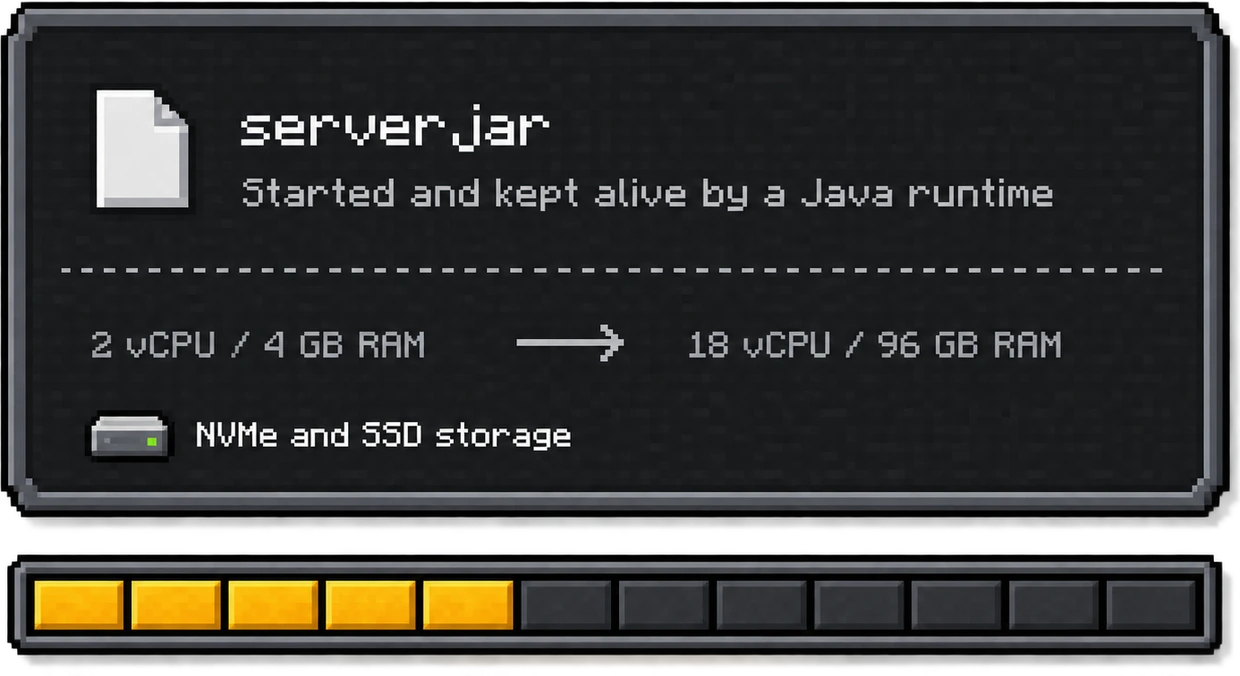
A Java Edition server is one file, a .jar, started by a Java runtime. Everything that makes it fast or slow comes down to what that runtime is allowed to use: a slice of processor, a heap of memory, and a disk to write chunks to. Our seven plans hand you 2 vCPU and 4 GB at the bottom and 18 vCPU and 96 GB at the top, on NVMe and SSD rather than spinning disks, so that is the number to shop on.

The disk is the part people forget. A world grows while it is played: every chunk a player walks into is generated once and then written down for good, so a year of survival on the same seed takes up more room than the day it started. That is why the disk climbs with the plan instead of staying flat, and why a modpack that generates its own dimensions asks for more of it than vanilla ever will.

A dark Minecraft style panel showing the file server.jar started and kept alive by a Java runtime, the sizes 2 vCPU with 4 GB RAM up to 18 vCPU with 96 GB RAM, NVMe and SSD storage, and a bar of 12 memory steps with the first five filled
4 GB12 steps in between96 GB
02

An address, and port 25565

You reach it the way any Java player reaches a server: an address and port 25565, typed into the multiplayer screen of the desktop client on Windows, macOS or Linux. Nothing extra is installed on the player's side, and there is no store entitlement to hand out. A Microsoft account that owns Java Edition is the whole requirement.

That port is the Java one. Java Edition speaks TCP on 25565 and Bedrock speaks UDP on 19132, which is why a Java plan needs one door open and a crossplay server needs both. You never have to type the number: every server we hand over gets a free subdomain, and the port sits behind it, so your players paste one address and are done.

The Add Server screen of the Minecraft client, with the name Survival and the address survival.mc.astroworldmc.com and port 25565 filled in, and the server showing 4 of 20 players at 12 ms in the server list
03

The real console, not a summary of it

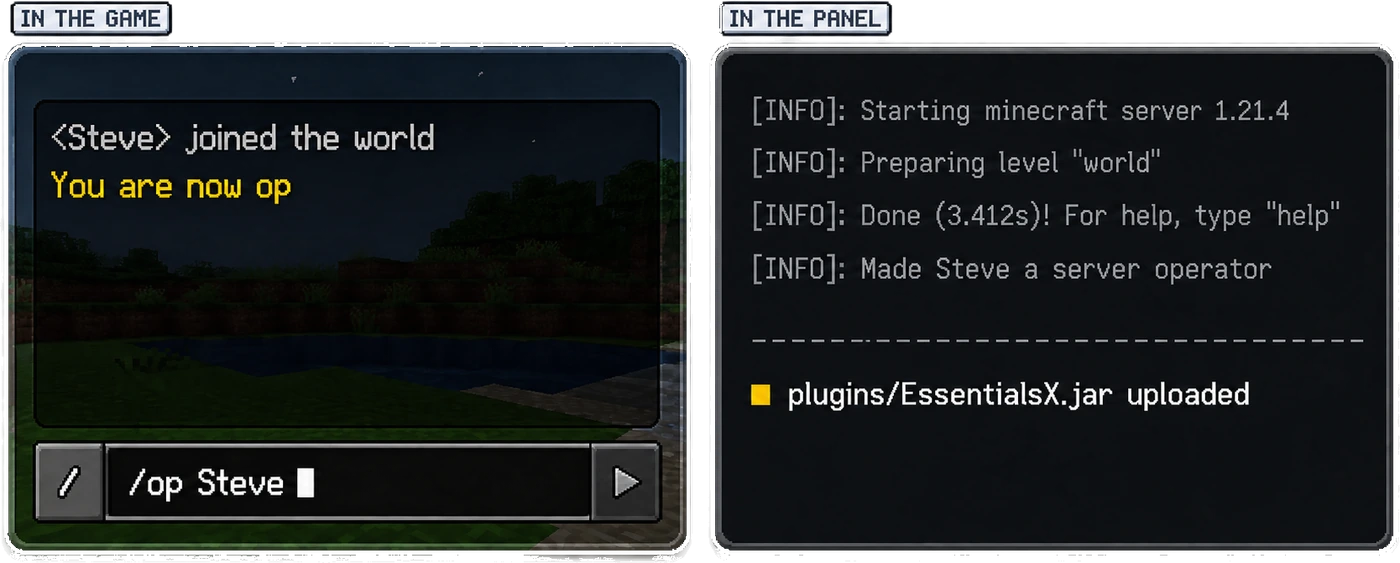
The console in our own panel, which drives Pterodactyl underneath, is the real server console, not a filtered version of it. Type /op there, watch the JVM print its startup lines, drop a jar into the file manager, restart. If you have never done that before, the plugin install guide walks through it once and you will not need it twice.

It is also where a Java server tells you what is wrong, in its own words. "Can't keep up! Is the server overloaded?" means a tick took longer than the fiftieth of a second it is given; "A single server tick took" is the watchdog counting down before it kills the process; and java.lang.OutOfMemoryError means the heap ran out, not the machine. Those three lines answer most of the questions people open a ticket for, and the Copilot reads the same log you do.

Two panels side by side. In the game: Steve joined the world, You are now op, and the command /op Steve being typed in the chat box. In the panel: the server log showing it starting Minecraft 1.21.4, preparing the level, done in 3.412 seconds, making Steve a server operator, and plugins/EssentialsX.jar uploaded
Java Edition

Which Minecraft Versions You Can Run: Releases You Can Boot

01

Every version in the list, old ones included

You pick the Minecraft version when you order, and you can change it later in the panel. Checkout carries 15 pinned releases plus a Latest setting that follows the newest build: 26.2, 26.1.2, 26.1.1, 1.21.11, 1.21.8, 1.21.4, 1.21.1, 1.20.6, 1.20.4, 1.20.1, 1.19.4, 1.18.2, 1.16.5, 1.12.2, 1.8.9. The old ones are on the list because people genuinely still run them. 1.8.9 is PvP muscle memory, 1.12.2 is where a decade of Forge packs sits, and 1.16.5 is the version half the plugin tutorials were written for.

Latest26.226.1.226.1.11.21.111.21.81.21.41.21.11.20.61.20.41.20.11.19.41.18.21.16.51.12.21.8.9
02

Nothing updates behind your back

Pinning matters more here than on any other edition. A mod or plugin is compiled against one release, so a server that updates itself is a server that breaks its own jar folder. You choose the version when you order and you change it in the panel, on your own timing, after the plugins you depend on have caught up.

Version26.2Auto update: off

Run the version your plugins were written for

Any release in the list, old ones included, and you change it in the panel on your own timing. Nothing updates behind your back, and moving between plans keeps the same address and the same world.

SoftwarePaper, Purpur, FabricVersion26.2A Minecraft character with a laptop, choosing the server software and the Minecraft version
Java Edition

Can Console and Phone Players Join: And the Players Who Are Not on PC

A console or phone cannot join a Java address on its own, which is a problem the moment one person in the group plays on a Switch. You do not have to pick a side or rent a second machine for it: the crossplay setup opens a second port on this same server for them, and the step by step for GeyserMC and Floodgate says which of these loaders can hold it. If you are still deciding which edition your community should live on, the Java against Bedrock comparison lays out what each side gives up.

Java Edition

Plans That Run Java Edition

7 sizes, and the loader list above is open on all of them: Mini boots the same Forge pack as Dedicated, it simply has 4 GB of heap to do it in where the other has 96 GB. Choose a term first, because the price on each card and the form behind each button both follow it.

Month to month, Mini is €8.49; on the twelve month term it is €7.79. It is also the only one of the 7 with a setup fee, €2.99 on a monthly term, and nothing at all from six months upward.

The Same Six Things Under Each Plan

NVMe as the standard disk

40 GB on Mini, 350 GB on Dedicated, with NVMe as the standard disk. Chunk writes never queue behind a spinning platter.

7 server builds

Paper, Purpur, Fabric, Forge, NeoForge, Spigot and Vanilla, all at the same price, all swappable afterwards.

15 pinned releases

From 26.2 back to 1.8.9, plus a Latest setting. Nothing updates itself under your mods.

The real JVM console

Pterodactyl shows the server output as it is printed, and the file manager drops jars straight into plugins or mods.

Filtering, not an extra

DDoS filtering sits in front of all seven plans and is not one of the 5 paid add-ons.

A backup you press

The button in the panel opens again every 7 days. A daily one that runs by itself is the €1.89/mo add-on.

When None of the Six Is the Right Size

A modpack usually asks for an amount of memory that sits between two of the plans above, and paying for the next one up is paying for headroom you will not use. The slider on the home page builds the machine per step instead, 12 of them from 1 GB to 96 GB, and every loader on this page runs on whatever you land on.

Its term button shows one percentage for all 12 steps, since a build to measure is priced off a single rate. The cards further up do the sum per plan, which lands between 8 and 10 percent on a twelve month term, so the two numbers are allowed to differ on the same screen.

Java Edition

Java Edition Server Hosting, Questions People Ask

Seven things people ask us before they order. Click an item to read the answer, or read them all: nothing here is hidden behind a support ticket.

Java Edition

How much RAM does a Java Edition server need?

Vanilla Java with a handful of friends is comfortable on 4 GB, which is what Mini gives you. A modpack is the thing that changes the answer: a pack of a hundred mods wants 8 GB and a pack of three hundred wants 12 GB or more, because every mod loads its own classes into the same Java heap. The largest Java plan here, Dedicated, carries 96 GB.

Which server software can I run on Java Edition?

Our checkout offers 7 of them and every one is a Java build: Paper (recommended), Purpur, Fabric, Forge, NeoForge, Spigot, Vanilla. They all cost the same and run on the same hardware, so the choice is about what you want to install on top. You can swap the Java software later without losing the world.

Can I pick which Minecraft version my Java server runs?

Yes. You pick it in the order form and change it later in the panel. There are 15 pinned Java releases, from 26.2 down to 1.8.9, plus a Latest setting that follows the newest build. Nothing updates on its own, because a plugin compiled for one Java release breaks on the next one.

What port does a Java Edition server use?

Java Edition connects over TCP on port 25565. You do not have to hand that number to anyone: the free subdomain we give you carries it, so your players paste one address into the multiplayer screen of the Java client and are in.

Do I get the real Java console with my server?

Yes, our own panel gives you the running Java console rather than a filtered view of it. You type commands into the live process, watch the JVM print its startup lines, upload a jar into the file manager and restart. The AI Copilot reads that same Java log when you ask it why the server stalled.

Can players on a phone or console join my Java server?

Not on their own, because Java Edition is a separate edition from the one consoles and phones run. The crossplay setup opens a second door on the same machine for them, so you do not have to leave Java Edition or rent a second server for the people who are not on a PC.

Where will my Java server be hosted?

You pick the location before you pay, out of 27 of them, and the Java plan price is the same in the ones included with the plan. Latency to your own players decides this, not the edition: a Java server in Germany answers a German player faster than any hardware upgrade will.